Fenige - PaymentHub Service
Introduction
Fenige PaymentHub is a payment gateway allowing Customers to initiate transactions easily by placing a hosted payment button on their website or requesting a payment link via the API provided by PaymentHub. Transactions take place in a secure environment managed by PaymentHub. This solution lets Customers' users pay with: Bank cards (Visa and Mastercard), BLIK, Pay by Bank, Google Pay™, Apple Pay™ When users select Google Pay™ or Apple Pay™ and make a purchase, the customer receives an encrypted card payment token, which is encrypted on the Google Pay™ or Apple Pay™ side using Fenige's public key. The customer then provides this encrypted token to Fenige using the PaymentHub service, and Fenige handles the entire transaction process. To use this service, customers must be registered as merchants with Google Pay™ and Apple Pay™ to receive a card payment token, and they must have an active agreement with Fenige to process transactions.
Tip: Fenige demo application
is available here. To initiate transaction please
provide
testapikey in the merchant API key input field and then click "Checkout and Pay" button.
Transaction will be performed in test mode - the payer's balance will not be charged.
Quick Tour of a Simple Integration with PaymentHub
In this short guide to Fenige PaymentHub, you will learn about the basic flow of this payment method. It's worth going through this guide, as it may help you better understand the technical details later on. Fenige provides a PaymentHub Service API, implemented according to the REST model. This API offers methods to process transactions using cards, payment tokens obtained from Google Pay™ and Apple Pay™, and to authenticate cardholders using the 3D Secure protocol. The Fenige team actively supports customers with integration.
Transaction initialization
The first step of the each transaction always takes place in the Customer application. A Customer integrated with the Fenige PaymentHub solution should have the option to pay using Fenige PaymentHub:
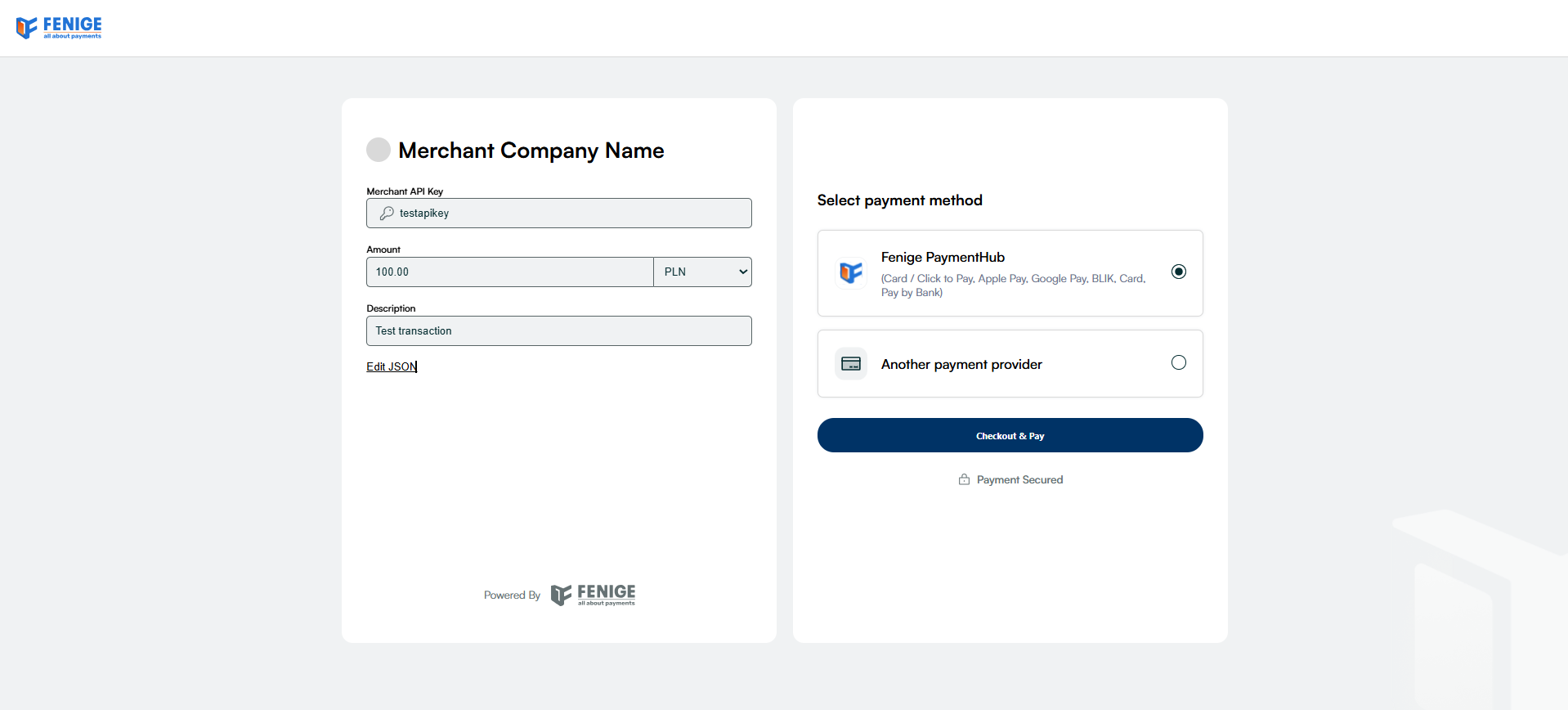
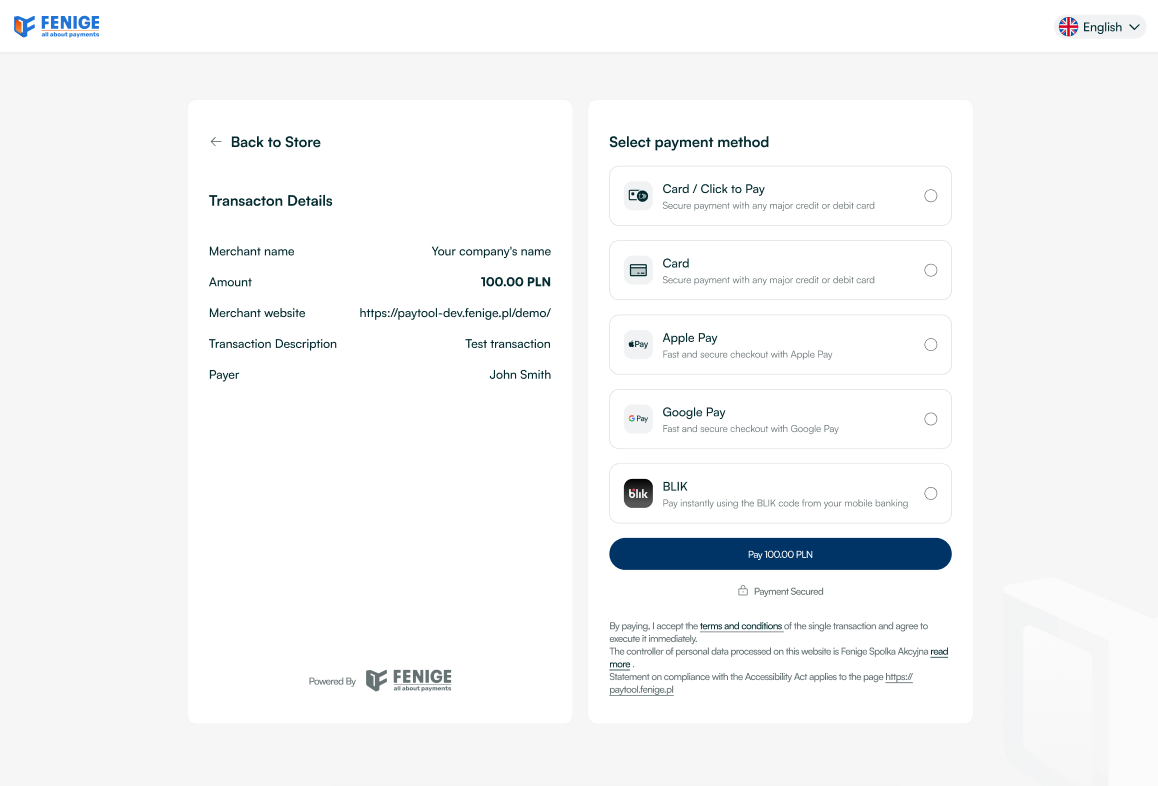
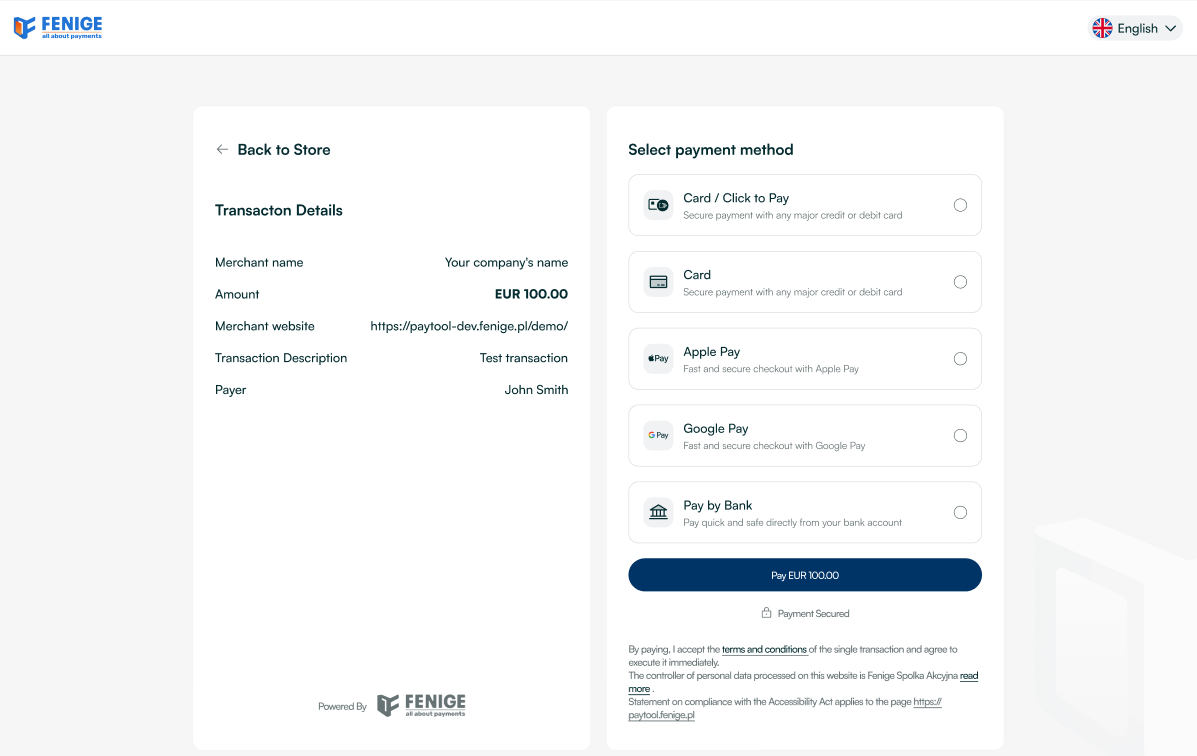
The end user is redirected to the Fenige PaymentHub application after selecting the "Checkout and Pay" option. At the same time Fenige PaymentHub SDK delivers the initial transaction data to the Fenige PaymentHub application and the new transaction session is created. The view of transaction initialization from the end user's point of view is presented below:
- in PLN
- in EUR
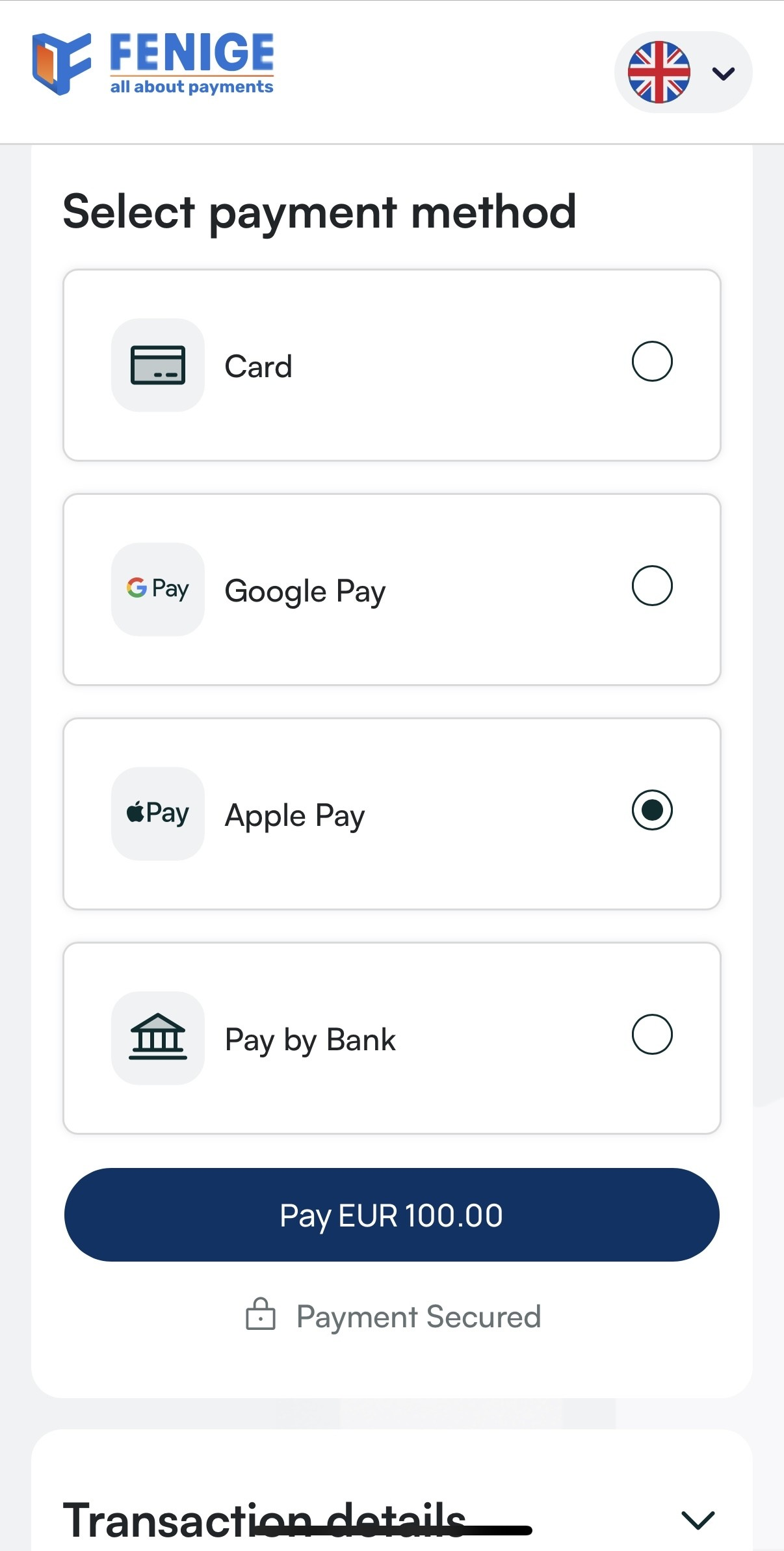
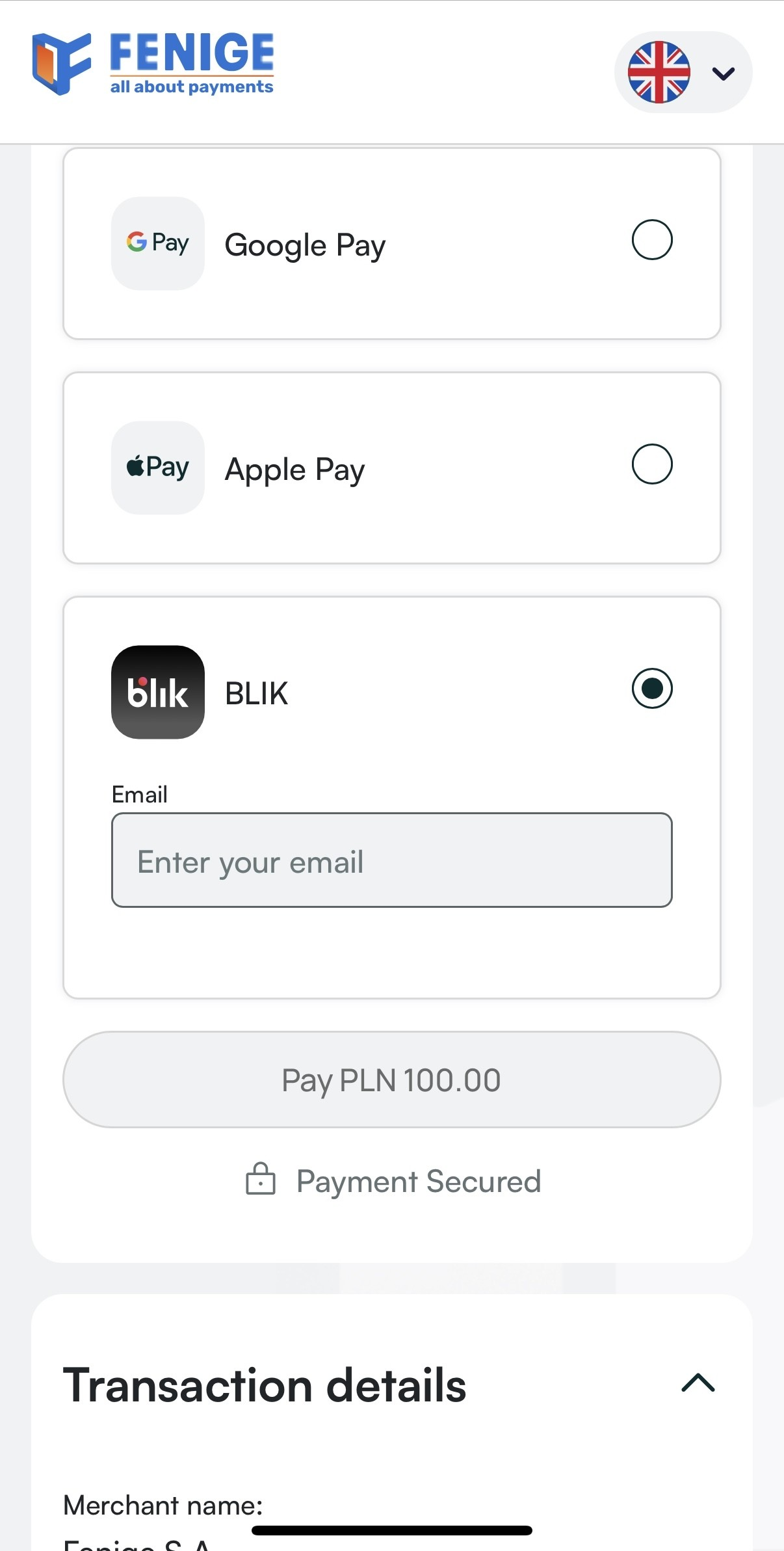
Fenige PaymentHub is fully responsible for the execution of the transaction and 3DS authentication process. The Customer only initialize transaction by redirecting the end user to the Fenige PaymentHub form and providing basic transaction metadata via the Fenige PaymentHub SDK plugged into his application.
Payment methods
Fenige as a PSP provides several different payment methods in its solution. What payment methods will be available in the Fenige PaymentHub application depends on the Customer's decision. This decision is made during the onboarding process and is editable. The end user, seeing the available payment methods, can choose the option that is most convenient for him. This chapter describes all payment methods supported by Fenige PaymentHub.
Info: It is required that the Customer has a created account in the Acquirer's system which settle his transactions. Fenige PaymentHub solution has been implemented so that it is possible to process transactions with the participation of various Acquirers. If the Customer requires the settlement of the transaction by a new Acquirer – to which Fenige is not integrated – there will be required new integration between Fenige and the new Acquirer. The specification of the new Acquirer should be provided by the Customer.
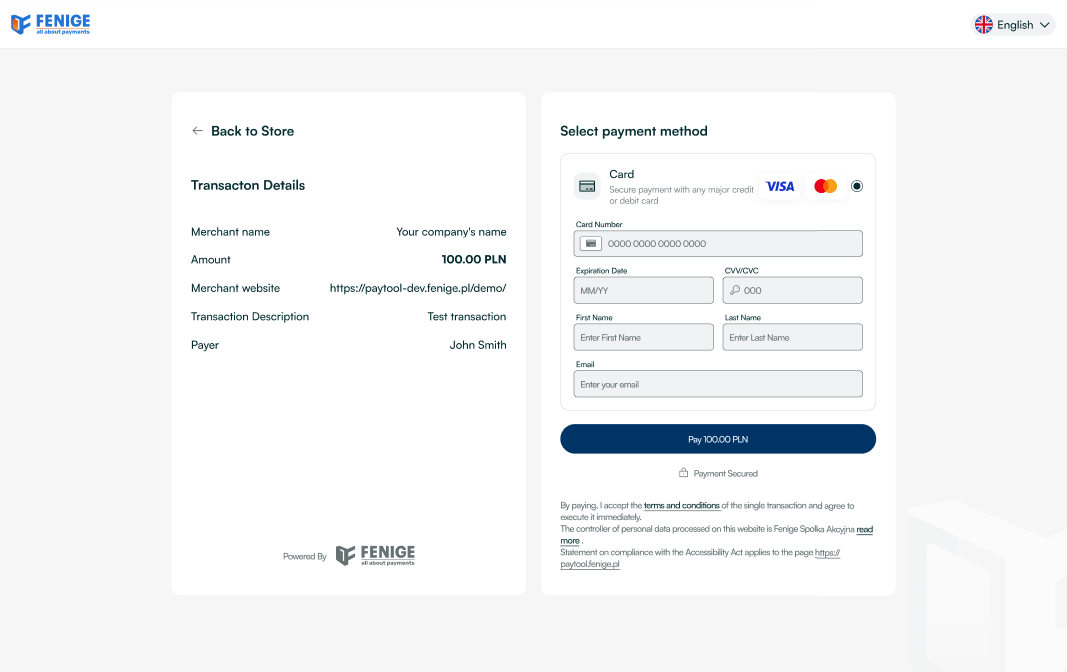
Plain card number
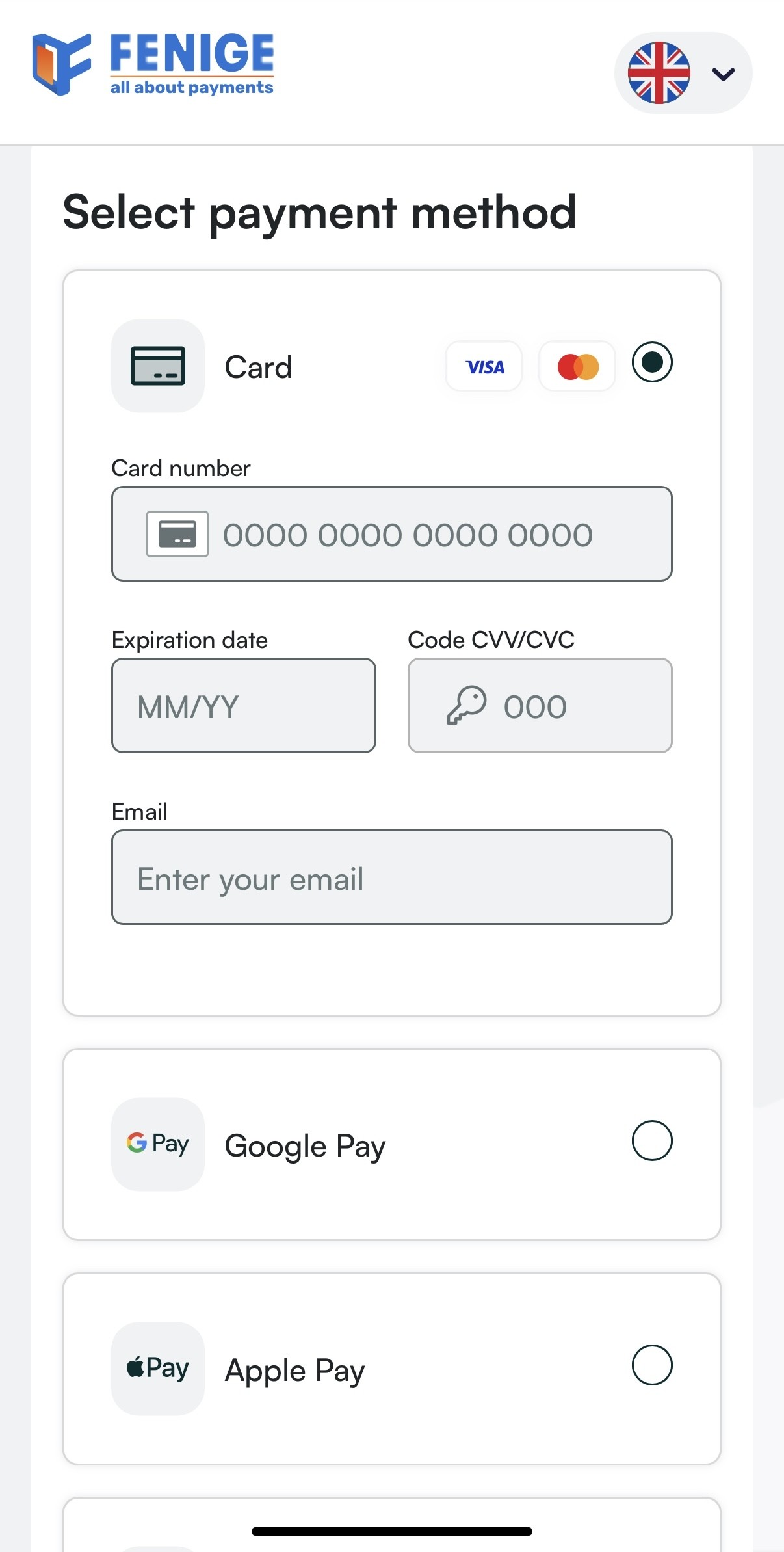
After clicking on the payment option using plain card details, the end user is redirected to the above mentioned payment form. Now he is able to provide the appropriate card details and clicks the "Pay" button at the bottom of the screen. At this point, the card details are encrypted and sent to the Fenige PaymentHub backend. Encrypted card details are decrypted on Fenige PaymentHub Backend layer with Fenige PSP private key and sent to the Acquirer in transaction request. At this moment 3DS authentication process may be required to perform. For more detailed information about the 3DS authentication process please visit 3DS chapter. The payment process using plain card details from the end user's perspective has been shown below:
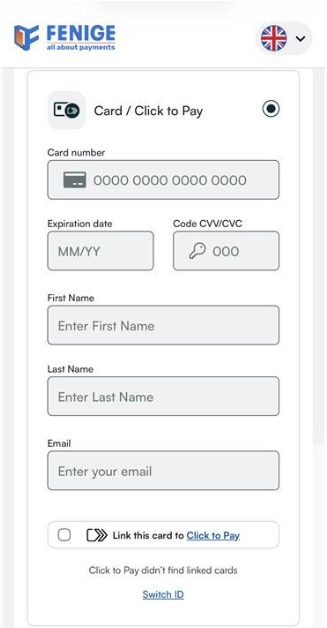
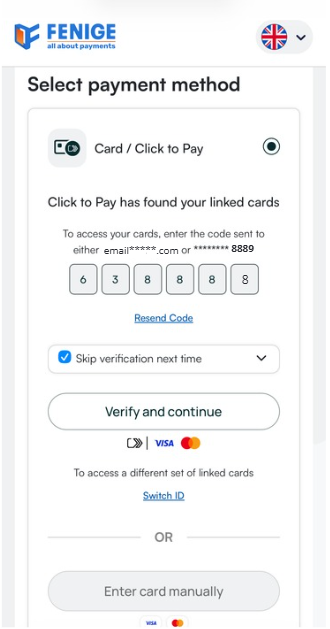
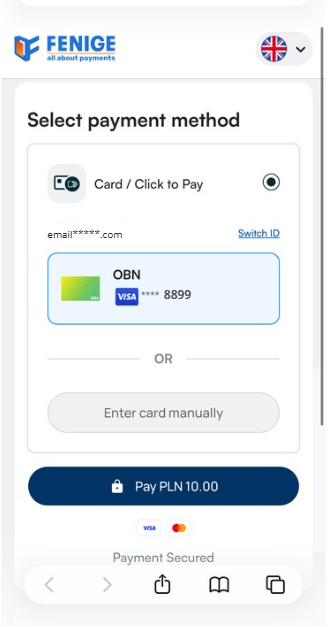
Card / Click to Pay
Fenige PaymentHub supports the 'Card / Click to Pay' method.
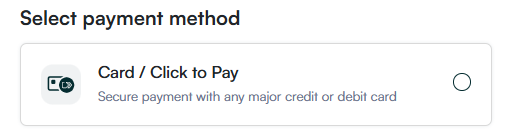
The method is available exclusively within the Fenige Hosted Payment Page integration model (visible payment gateway).
Click to Pay allows customers to complete e-commerce transactions using stored card details by selecting the 'Card / Click to Pay' option at checkout.
Once the card is saved in the Click to Pay profile, the customer does not need to re-enter the card details for future purchases
and will be recognized based on their email address and device. The solution supports both Visa and Mastercard cards, there is no functional
difference
from the merchant’s perspective, as Click to Pay natively supports both schemes.
The solution is based on tokenization - the card scheme securely stores the cardholder data and issues a token used for transaction processing
instead of the actual card details, enhancing overall transaction security.
The method also supports the standard card payment flow, enabling customers to manually enter their card details without storing them in the Click to Pay system.
Please note that the Click to Pay integration does not support recurring payments, which means it cannot be used for subscriptions or automatic top-ups.
Google Pay
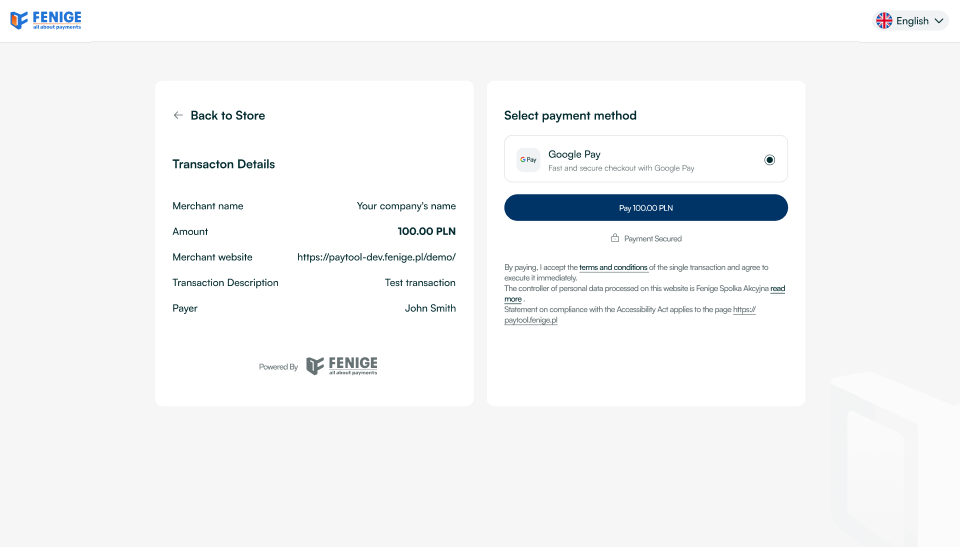
Fenige as a PSP registered in the Google Pay™ allows to perform a payment with card token generated by Google. Using Fenige PaymentHub the end user can choose the Google Pay™ as the payment method from the Fenige PaymentHub payment methods list. The option to pay with Google Pay™ card token is available at the button shown below:

After clicking on the Google Pay™ payment option, the Google Pay™ Wallet popup is displayed to the end user on the PaymentHub Fenige checkout. After the end user selects the appropriate card from the Google Pay™ Wallet, the card data is encrypted on the Google Pay™ side and transferred to Fenige PaymentHub server. There, the data is then decrypted and transferred to Acquirer in the transaction request. At this moment 3DS process may be required to perform. For more detailed information about the 3DS authentication process please visit 3DS chapter. The payment process using Google Pay™ card payment token from the end user's perspective has been shown below:
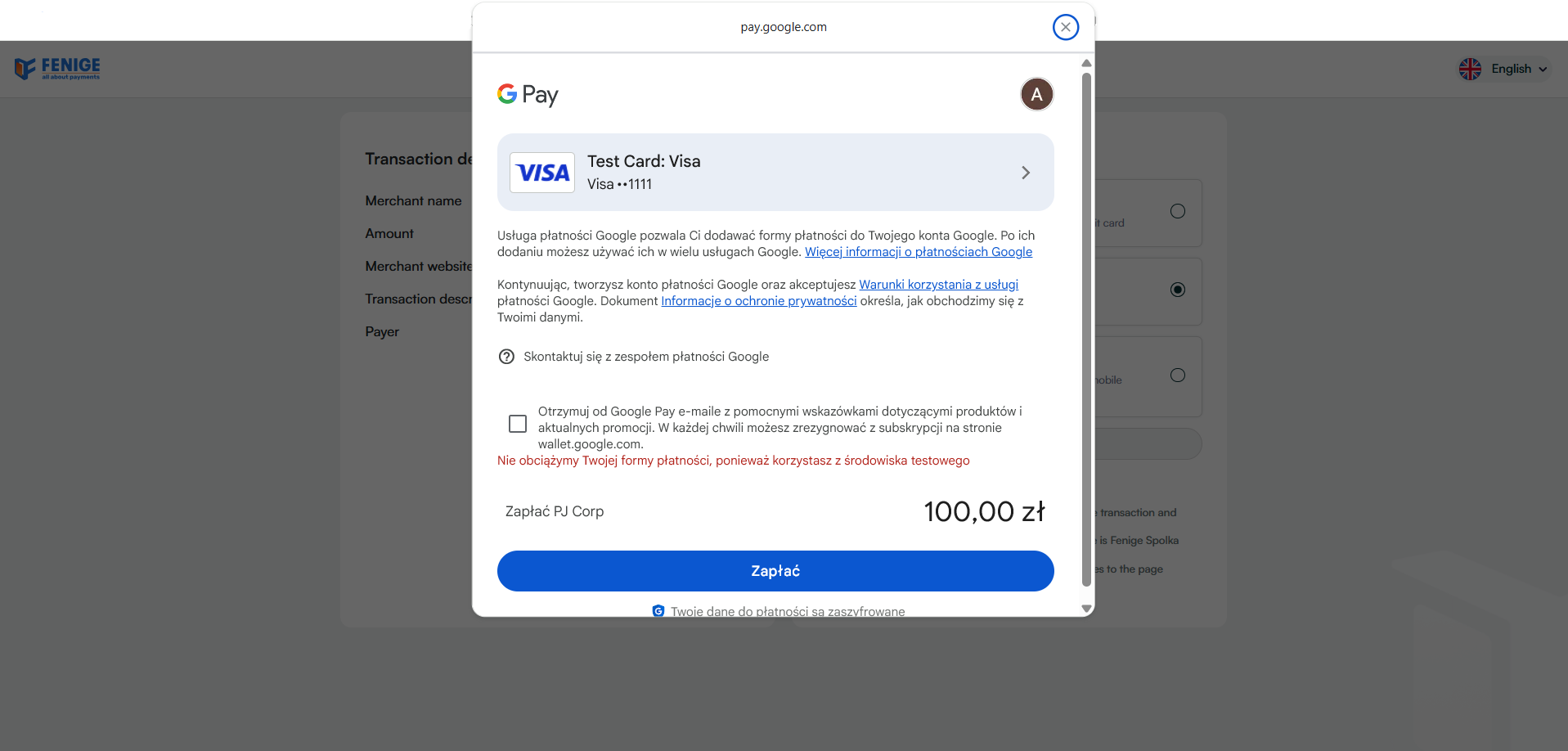
Apple Pay
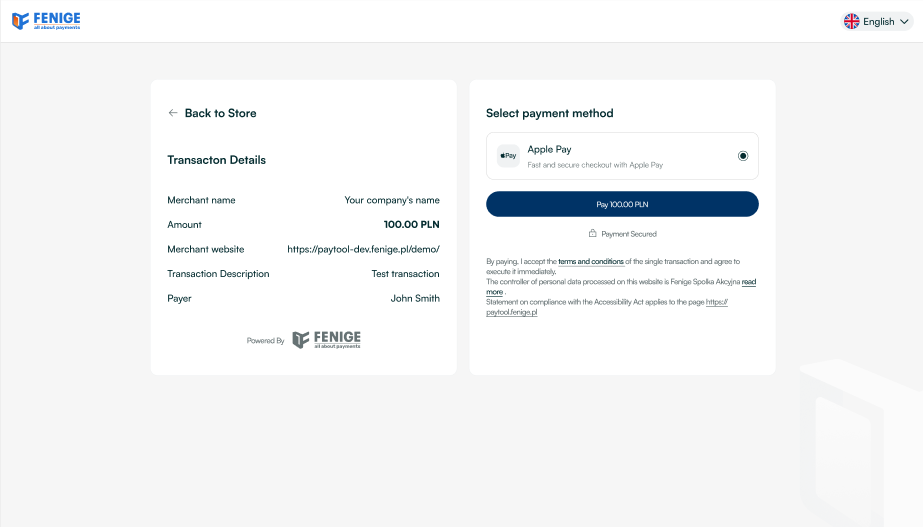
Fenige as a PSP registered in the Apple Pay™ allows to perform a payment with card token generated by Apple. Using Fenige PaymentHub the end user can choose the Apple Pay™ as the payment method from the Fenige PaymentHub payment methods list. The option to pay with Apple Pay™ card token is available at the button shown below:

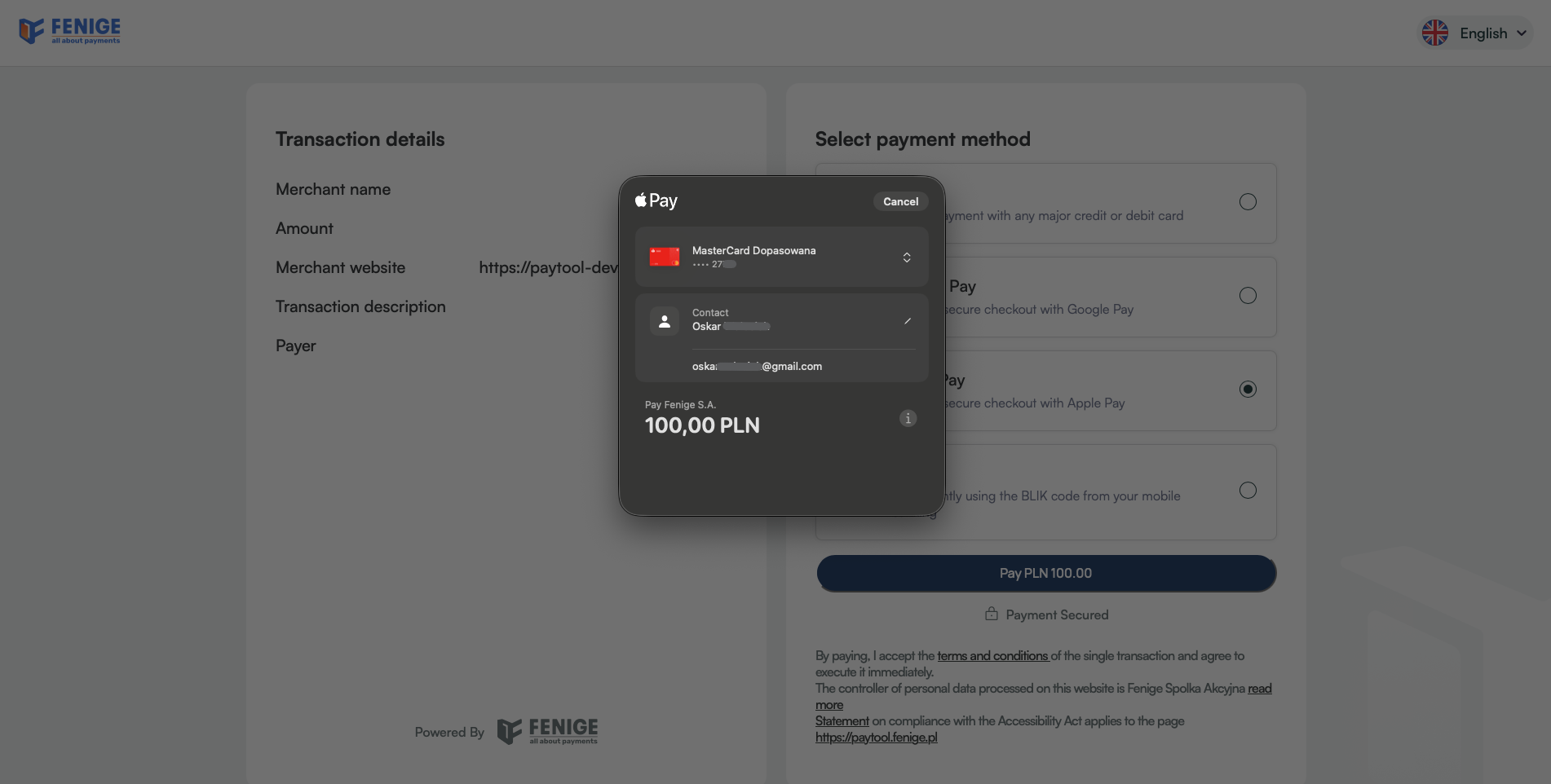
After clicking on the Apple Pay™ payment option, the Apple Pay™ Wallet
popup is displayed to the end user on the PaymentHub Fenige checkout. After the end user selects the
appropriate card from the Apple Pay™ Wallet, the card data is encrypted on the Apple Pay™ side and
transferred to Fenige PaymentHub server. There, the data is then decrypted and transferred to Acquirer
in
the
transaction request. At this moment 3DS process may be required to perform. For more detailed
information
about the 3DS
authentication process please visit 3DS chapter. The payment process using Apple Pay™
card payment token from the end user's perspective has been shown below:
BLIK
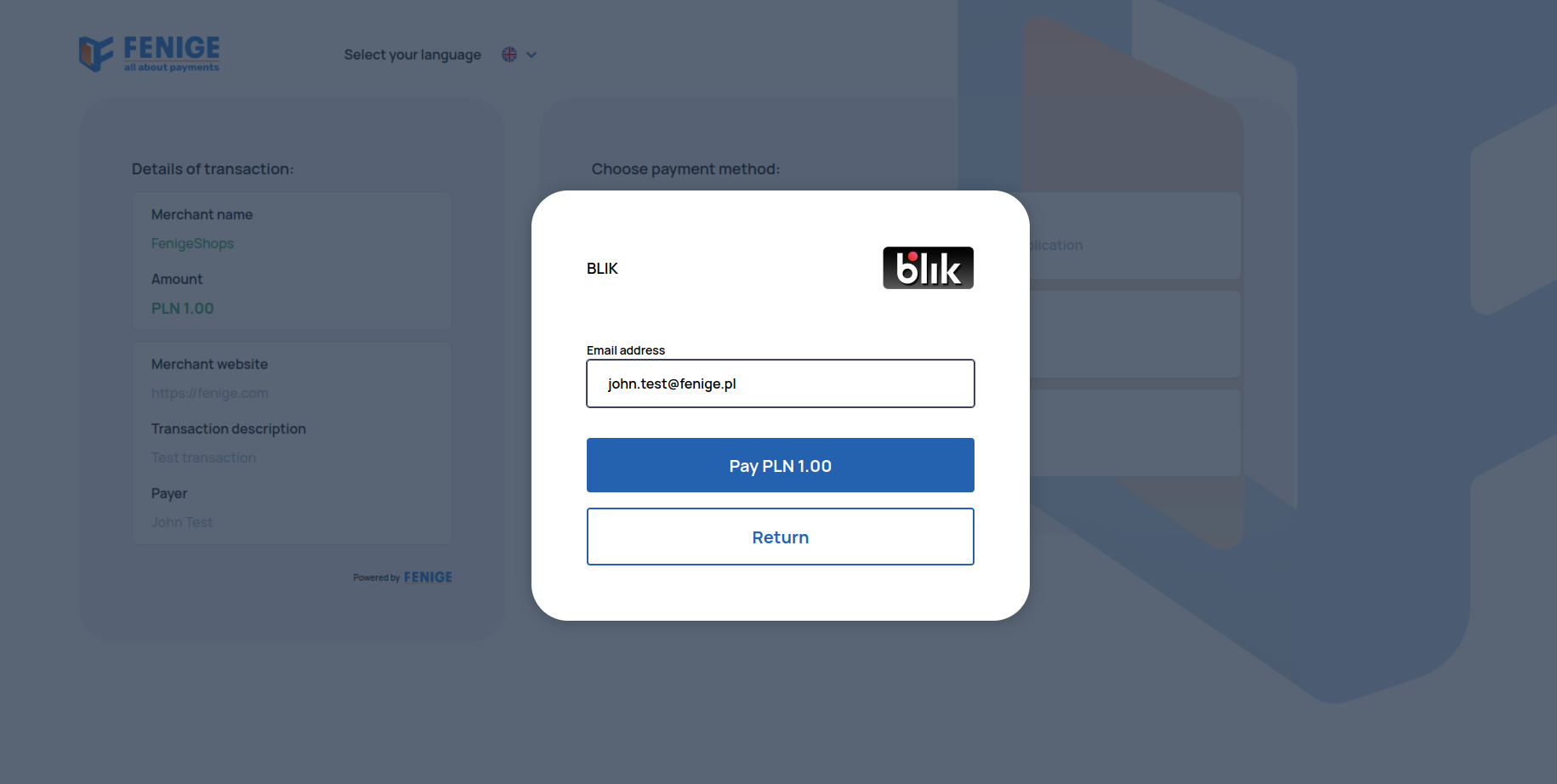
Fenige PaymentHub also supports cardless payments using the BLIK code. The end user can choose the BLIK as the payment method from the Fenige PaymentHub payment methods list. The option to pay with BLIK code is available at the button shown below:

After selecting
this
payment method, the end user must provide his e-mail address in the proper field in displayed popup and
then
confirm the willingness to make the transaction. BLIK as an external service, in response to a request,
opens a view that allows end user to enter the 6 digits code. This step of the process takes place
outside
the Fenige PaymentHub system. The 6 digits BLIK code is generated in the end user's bank application.
The
payment process using BLIK code from the end user's perspective has been shown below:
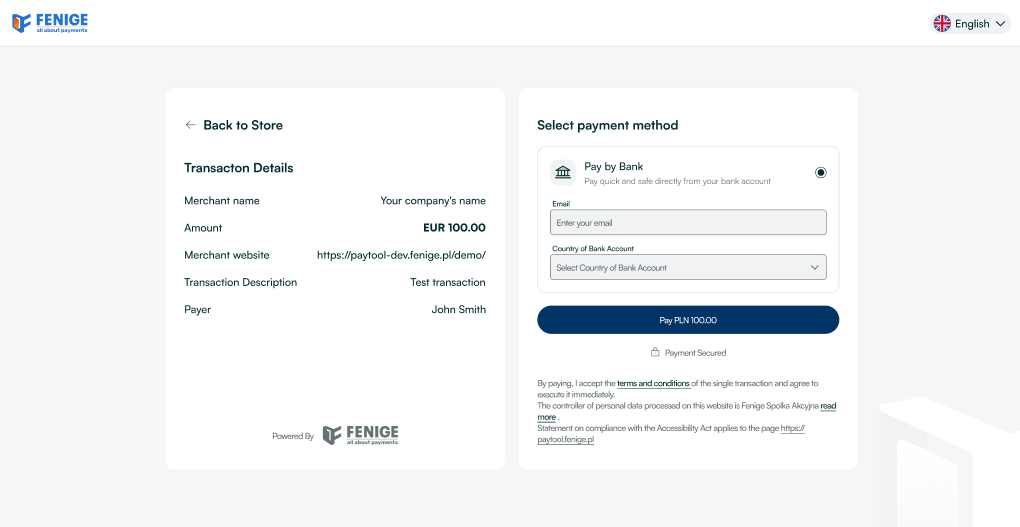
Pay by Bank
Fenige PaymentHub enables users to pay directly from their bank account without manually entering payment details. The user selects their bank, logs in, and authorizes the transfer, which is automatically processed to the recipient’s account. The process is secure and compliant with European open banking regulations and strong customer authentication (SCA). This payment method is available only in euros (EUR) and restricted to selected European countries. The option to pay with Pay by Bank code is available at the button shown below:

After selecting the payment method, the user enters their email address and chooses the country where
their
bank
account is held, then selects their bank to continue the process. The payment process using Pay by Bank
from
the end user's perspective has been shown below:
Allowed card networks
Listed below are the types of cards supported in transactions:
|
Card type |
|
|
|
|
Funding from Card
Funding from Card is a transaction type initiated using Visa Direct and Mastercard MoneySend services. The key difference between this type of transfer and regular payment transactions is its purpose.
Regular transactions are intended for the purchase of goods or services, while the primary purpose of a Funding from Card transaction is money movement, such as sending or transferring funds.
Global Anti-Money Laundering (AML) and Counter-Terrorist Financing (CTF) regulations require that money transfers include specific controls to properly identify both the sender and the recipient.
Therefore, Visa and Mastercard require certain transactions to be processed as Funding from Card. This transaction type allows sending additional sender/recipient information to Visa and Mastercard, enabling enhanced monitoring by card schemes and issuing banks.
Below are examples of scenarios where Visa and/or Mastercard require the use of Funding from Card:
- Loading funds to a wallet (crypto, non-crypto, gambling or any other stored-value wallet) – Visa & Mastercard
- Purchasing cryptocurrency* – Visa only
- Moving funds, like funding any account in order to transfer money to another account belonging to the same person, another person, or an entity – Visa & Mastercard
*Purchasing cryptocurrency is a special case. Even though it is technically a purchase (the cardholder is buying an asset, not merely transferring funds), Visa requires these transactions to be processed as Funding from Card. This exception exists due to elevated AML/CTF risks and the need for enhanced sender/recipient information and monitoring.
If you are unsure whether your transaction must be submitted as Funding from Card or as a regular purchase, please consult with your Account Manager.
South Pacific Countries
For these South Pacific countries, additional address information must be provided:
-
American Samoa (AS)
-
British Indian Ocean Territories (IO)
-
Christmas Island (CX)
-
Cocos (Keeling) Island (CC)
-
Cook Islands (CK)
-
Fiji (FJ)
-
French Polynesia (PF)
-
French Southern Territories (TF)
-
Heard & McDonald Island (HM)
-
Kiribati (KI)
-
Marshall Islands (MH)
-
Nauru (NR)
-
New Caledonia (NC)
-
Niue (NU)
-
Norfolk Island (NF)
-
Northern Mariana Islands (MP)
-
Palau (PW)
-
Papua New Guinea (PG)
-
Pitcairn (PN)
-
Samoa (WS)
-
Solomon Islands (SB)
-
Timor-Leste (TL)
-
Tokelau (TK)
-
Tonga (TO)
-
Tuvalu (TV)
-
U. S. Minor Outlying Islands (UM)
-
Vanuatu (VU)
-
Wallis and Futuna Islands (WF)
Mocks for tests
Mock cards
Here are test cards with a defined ResponseCode running only on the
STAGING environment.
Please note that these are just card ranges, you need to generate a valid card number that will be
included
in this card range (e.g. using any online generator that
generates cards based on bin - first 6 digits).
| Begin | End | RC | MAC | Card Country | Currency |
|---|---|---|---|---|---|
| 5117960000000000 | 5117962249999999 | CODE_00 | x | PL | PLN |
| 5117962250000000 | 5117964499999999 | CODE_00 | x | DE | EUR |
| 5117964500000000 | 5117966749999999 | CODE_00 | x | US | USD |
| 5117966750000000 | 5117968999999999 | CODE_00 | x | GB | GBP |
| 5486000000000000 | 5486009999999999 | CODE_05 | x | PL | PLN |
| 5402060000000000 | 5402069999999999 | CODE_30 | x | PL | PLN |
| 5406603500000000 | 5406603599999999 | CODE_05 | 03 | PL | PLN |
| 5167680100000000 | 5167680199999999 | CODE_63 | x | PL | PLN |
| 5296730000000000 | 5296730999999999 | CODE_65 | x | PL | PLN |
| 5238140000000000 | 5238140999999999 | CODE_1A | x | PL | PLN |
| Begin | End | RC | Card Country | Currency |
|---|---|---|---|---|
| 4400430000000000 | 4400430099999999 | CODE_00 | PL | PLN |
| 4400430100000000 | 4400430199999999 | CODE_00 | DE | EUR |
| 4400430200000000 | 4400430299999999 | CODE_00 | US | USD |
| 4400430300000000 | 4400430349999999 | CODE_00 | GB | GBP |
| 4400430350000000 | 4400430399999999 | CODE_00 | UA | UAH |
| 4444184330000000 | 4444184339999999 | CODE_05 | PL | PLN |
| 4444184320000000 | 4444184329999999 | CODE_30 | PL | PLN |
| 4444184310000000 | 4444184319999999 | CODE_N7 | PL | PLN |
| 4539120000000000 | 4539120999999999 | CODE_65 | PL | PLN |
| 4567810000000000 | 4567810999999999 | CODE_1A | PL | PLN |
Mock 3DS
The range of card BINs supporting 3DS 2.X for Mastercard is: 500000-549999 Visa is : 400000-449999
In the test environment, you have the option of calling different transactionStatus,
depending on the amount field. For example:
| Purchase Amount Range | Transaction Status | Description |
|---|---|---|
| (1, 1000) | Y | Authentication/account verification successful. |
| (1001, 2000) | A | Attempts processing performed; not authenticated/verified, but a proof of attempted authentication/verification is provided. |
| (2001, 3000) | C | Challenge required; additional authentication is required using the CReq/CRes. |
| (3001, 4000) | N | Not authenticated/account not verified; transaction denied. |
| (4001, 5000) | U | Authentication/account verification could not be performed; technical or other problem as indicated in ARes or RReq. |
| (5001, 6000) | I | Informational only; 3DS Requestor challenge preference acknowledged. |
Onboarding
Register in Fenige
The onboarding process takes place mainly on Fenige side. However, in order to perform onboarding, the Customer must provide some information needed to correctly configure account in PaymentHub Service. Configuration includes following information:
| Customer name | Basically, it's the name of the Customer's company, his online shop and so on. |
| Postback URL | This is the address to which information will be send to the Customer about the transaction made by a given user. This parameter is not required if the Customer does not want to receive notifications regarding the transaction. For more information about Postback URL please check Use cases chapter. |
| Notification to the user | It is a flag that defines whether e-mail notifications was sent to the User. Such e-mail contains the transaction status, transaction execution date, transaction identifier, date and amount. The Customer decides whether Fenige will send such e-mails or not. |
| Redirect Url | Is the URL to which the user is redirected after completing a specific action or process. |
| Merchant website url | Is the URL to customer website. |
| Available payment methods | Customer inform which methods payments want have enabled on payment page(Card, Google Pay, Apple Pay, Pay by Bank, BLIK). |
After creating an account for the Customer, Fenige provides necessary data to the Customer. This data is required to use the PaymentHub Service API. Such data includes:
| Api Key | This key is required to identify the merchant in the PaymentHub system. |
| Username | This value is optional, but required to authorization when customer want get status from Fenige API. |
| Password | This value is optional, but required to authorization when customer want get status from Fenige API. |
Authorization data on STAGING and PROD environments differ in password. The login and the gateway Id is the same on both environments.
Integration with PaymentHub Service
SDK
Initialization - Add the following script to your website:
SDK script - staging
<script type="module" src="https://paytool-dev.fenige.pl/paytool.js"> </script>This script contains information about the default payment button for PaymentHub. We provide an example button for PaymentHub, but you can edit it in any way you want. Here you will also find the address to which the user will be transferred after selecting the PaymentHub option. The script code to connect:
Paytool.js
var c=(o,n,t)=>{if(!n.has(o))throw TypeError("Cannot "+t)};var u=(o,n,t)=>(c(o,n,"read
from private field"),t?t.call(o):n.get(o)),r=(o,n,t)=>{if(n.has(o))throw
TypeError("Cannot add the same private member more than once");n instanceof
WeakSet?n.add(o):n.set(o,t)},b=(o,n,t,e)=>(c(o,n,"write to private field"),e?e.call(o,t):n.set(o,t),t);var
d=(o,n,t)=>(c(o,n,"access private method"),t);import{r as f,j as s,t as k,b as w,e as
j}from"./assets/toClassName-27ff9a21.js";const
E=`:host
{
display: inline-block;
}
button {
font-family: -apple-system, BlinkMacSystemFont, 'Segoe UI', Roboto, Oxygen,
Ubuntu, Cantarell, 'Fira Sans', 'Droid Sans', 'Helvetica Neue', sans-serif;
background: #1b74ff;
border: none;
border-radius: 24px;
padding: 12px 24px;
color: white;
font-weight: bold;
cursor: pointer;
user-select: none;
transition: background 200ms ease-out;
overflow: hidden;
position: relative;
}
button.loading span:first-child {
opacity: 0;
}
button.loading span:last-child {
position: absolute;
inset: 0;
display: flex;
justify-content: center;
align-items: center;
}
button:hover {
background: #2d7eff;
}
button:focus {
background: #196aee;
transition: none;
}
button:disabled {
background: #c5c5c5;
color: #878787;
cursor: default;
}
`;function
S({payTool:o,data:n}){const[t,e]=f.useState(!1),[m,h]=f.useState(!1),g=()=>{t||!n||(e(!0),o.init(n).catch(()=>{h(!0),setTimeout(x,2e3)}))},x=()=>{h(!1),e(!1)};return
s.jsxs(s.Fragment,{children:[s.jsx("style",{children:E}),s.jsxs("button",{onClick:g,className:k({loading:t}),disabled:!(n!=null&&n.amount),children:[s.jsx("span",{children:"Pay
with Payhub"}),t&&s.jsx("span",{children:m?"Error":"Loading..."})]})]})}class
y{async init({apiKey:n,...t}){const
e=await w.post("transactions/pre-initialization",t,{headers:{"api-key":n}});location.href=`https://paytool-dev.fenige.pl/${e.data.transactionId}`}}var
l,a,i,p;class v extends HTMLElement{constructor(){super();r(this,i);r(this,l,new y);r(this,a,void
0);this.attachShadow({mode:"open"})}set
data(t){d(this,i,p).call(this,t)}connectedCallback(){b(this,a,j.createRoot(this.shadowRoot)),d(this,i,p).call(this,null)}}l=new
WeakMap,a=new WeakMap,i=new
WeakSet,p=function(t){u(this,a).render(s.jsx(S,{payTool:u(this,l),data:t}))};customElements.get("paytool-button")||customElements.define("paytool-button",v);window.Paytool=y;
The type="module" attribute is currently required, because the SDK utilizes modern JavaScript code splitting syntax.
After add script on app you should prepare data to send to PaymentHub. Underneath is only basic code html:
PaymentHub request - example html code
<!DOCTYPE html><html lang="en">
<head>
<meta name="viewport" content="width=device-width, initial-scale=1.0" />
<script
type="module"
src="https://paytool-dev.fenige.pl/paytool.js"></script>
</head>
<body>
<paytool-button></paytool-button>
<script>window.addEventListener('DOMContentLoaded', function () {
var paytool = document.querySelector('paytool-button');
paytool.data = {
apiKey: 'YOUR_API_KEY',
currencyCode: 'CURRENCY_CODE'
amount: 9999,
receiverAmount: 'RECEIVER_AMOUNT'
description: 'DESCRIPTION'
merchantUrl: 'MERCHANT_URL'
orderNumber: 'ORDER_NUMBER'
formLanguage: 'EN'
redirectUrl: {
successUrl: 'FIRST_NAME'
failureUrl: 'FIRST_NAME'
sender: {
firstName: 'FIRST_NAME'
lastName: 'LAST_NAME'
address: {
countryCode: 'COUNTRY_CODE'
city: 'CITY'
postalCode: 'POSTAL_CODE'
street: 'STREET'
houseNumber: 'HOUSE_NUMBER'
transactionConfigurationId: 'TRANSACTION_CONFIGURATION_ID'
};
});
</script>
</body>
</html>
After meeting the above requirements in section the payment method, the PaymentHub Fenige button become visible, which will redirect the user to our website.
Example html:
|
|
Request fields |
|||
|
Name |
Type |
Validation |
Description |
|
|
|
Optional |
This UUID is the ID of the entire transaction process. If you do not send this, it will be generated automatically and returned in the response. In case you decide to send this value, it must be unique |
|
|
|
Optional |
When value will be true, payment page will be open in new window |
|
|
|
Not null, Not empty |
This API key is generated by PaymentHub to authenticate the merchant in our system |
|
|
|
@Must not be null, @Must be at least 100 |
Transaction amount (in pennies). [1PLN = 100] |
|
|
|
Not empty |
Transaction currency |
|
|
|
Length(min = 2, max = 2) |
Country code in accordance with ISO 3166-1 Alpha-2. Is required for terminal crypto. Country of residence sent in preInitialization will not be required in the payment form by the end user. |
|
|
|
Passing CARD here will directly display only the card form. If null is sent, the default payment configuration will be retrieved. |
|
|
|
|
Optional |
Transaction description |
|
|
|
Optional |
The successUrl field will be responsible for redirecting the user after a transaction. If it is not provided, a default value from the configuration will be used |
|
|
|
Optional |
The failureUrl field will be responsible for redirecting the user after a transaction. If it is not provided, a default value from the configuration will be used |
|
|
|
Optional |
The cancelUrl field will be responsible for redirecting the user after a transaction. If it is not provided, a default value from the configuration will be used |
|
|
|
Optional. @Length(min = 2, max = 35), @Pattern(regexp = ^(?!\s)(?!.*\x20{2})(?!.*\p{C})(?!.*[\p{Z}&&[^\x20]])(?!.*\p{S})[^0-9!#|$^`\\~_%&\"'(){}*+,./:;<=>?@\t\n\]\[]*(?<!\s)$). Cannot contains tabulations and line breaks. |
The firstName field represents the user's first name. If the value is not provided, it will be retrieved from the user at a later stage of the payment process |
|
|
|
Optional. @Length(min = 2, max = 35), @Pattern(regexp = ^(?!\s)(?!.*\x20{2})(?!.*\p{C})(?!.*[\p{Z}&&[^\x20]])(?!.*\p{S})[^0-9!#|$^`\\~_%&\"'(){}*+,./:;<=>?@\t\n\]\[]*(?<!\s)$). Cannot contains tabulations and line breaks. |
The lastName field represents the user's last name. If the value is not provided, it will be retrieved from the user at a later stage of the payment process |
|
|
|
Optional. @Length(min = 1, max = 128) @Pattern(regexp = ^(?:[A-Za-z0-9]{1,}[\.!#$%&'*+/=?`{|}~^\-_]?){1,}[A-Za-z0-9_-]*@((?:[a-zA-Z0-9]+(?:-[a-zA-Z0-9]+)*\.){1,}[a-zA-Z]{2,})$) |
The email field represents the user's email. If the value is not provided, it will be retrieved from the user at a later stage of the payment process |
|
|
|
Optional |
Two character ISO 3166-1 alpha-2 code of country |
|
|
|
Optional |
Name of the city where cardholder lives |
|
|
|
Optional |
Postal code of this address |
|
|
|
Optional |
Street name in the city |
|
|
|
Optional |
House number with optional flat number |
|
|
|
Optional |
Apartment number |
|
|
|
Optional |
Province code |
|
|
|
Optional |
Two character ISO 3166-1 alpha-2 code of country |
|
|
|
Optional |
Name of the city where cardholder lives |
|
|
|
Optional |
Postal code of this address |
|
|
|
Optional |
Street name in the city |
|
|
|
Optional |
House number with optional flat number |
|
|
|
Optional |
Apartment number |
|
|
|
Optional |
Province code |
Endpoints
Endpoints chapter contains description of endpoints for PaymentHub Service
methods. Fenige provides two implementation environments: test - STAGING and production -PROD
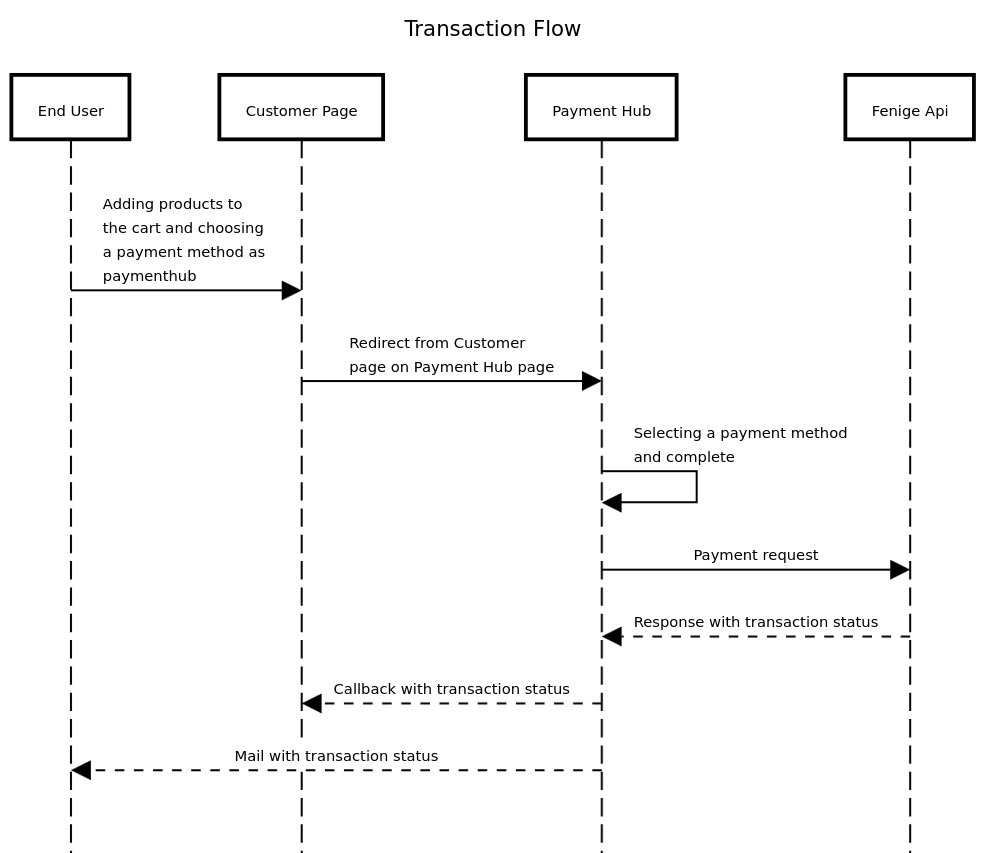
Transaction Flow
Transaction statuses
The table below presents all possible transaction statuses:
|
Name |
Description |
|
|
Transaction waiting for execution. |
|
|
Transaction was finished with status failure |
|
|
Transaction success was finished with status success |
|
|
Transaction success was finished with status success, but is waiting for manual clearing |
|
|
Transaction was in a status SUCCESS_WAITING_FOR_CLEARING and then was reversed by method REVERSE. |
|
|
Bank account was charged. |
Response codes
Mastercard/VISA response codes (ISO 8583). Statuses in accordance with ISO-8583.
| Response Code | Reason | Authorization Status |
|---|---|---|
| CODE_00 | Approved or completed successfully | APPROVED |
| CODE_01 | Refer to card issuer | DECLINED |
| CODE_02 | Refer to card issuer’s special conditions | DECLINED |
| CODE_03 | Invalid merchant or service provider | DECLINED |
| CODE_04 | Pick up card (no fraud) | DECLINED |
| CODE_05 | Do not honor | DECLINED |
| CODE_06 | General error | DECLINED |
| CODE_07 | Pick up card, special condition (fraud account) | DECLINED |
| CODE_08 | Honor with ID | DECLINED |
| CODE_09 | Request in progress | DECLINED |
| CODE_10 | Approved for partial amount | APPROVED |
| CODE_11 | Approved (V.I.P) | DECLINED |
| CODE_12 | Invalid transaction | DECLINED |
| CODE_13 | Invalid amount | DECLINED |
| CODE_14 | Invalid account number (no such number) | DECLINED |
| CODE_15 | Invalid issuer/No such issuer | DECLINED |
| CODE_16 | Approved, update track 3 | DECLINED |
| CODE_17 | Customer cancellation | DECLINED |
| CODE_18 | Customer dispute | DECLINED |
| CODE_19 | Re-enter transaction | DECLINED |
| CODE_20 | Invalid response | DECLINED |
| CODE_21 | No action taken | DECLINED |
| CODE_22 | Suspected malfunction | DECLINED |
| CODE_23 | Unacceptable transaction fee | DECLINED |
| CODE_24 | File update not supported by receiver | DECLINED |
| CODE_25 | Unable to locate record in file | DECLINED |
| CODE_26 | Duplicate file update record | DECLINED |
| CODE_27 | File update field edit error | DECLINED |
| CODE_28 | File temporarily not available | DECLINED |
| CODE_30 | Format error | DECLINED |
| CODE_31 | Bank not supported by switch | DECLINED |
| CODE_32 | Completed partially | DECLINED |
| CODE_33 | Expired card | DECLINED |
| CODE_34 | Suspected fraud | DECLINED |
| CODE_35 | Card acceptor contact acquirer | DECLINED |
| CODE_36 | Restricted card | DECLINED |
| CODE_37 | Card acceptor call acquirer security | DECLINED |
| CODE_38 | Allowable PIN tries exceeded | DECLINED |
| CODE_39 | No credit account | DECLINED |
| CODE_40 | Requested function not supported | DECLINED |
| CODE_41 | Lost card, pick up (fraud account) | DECLINED |
| CODE_42 | No universal account | DECLINED |
| CODE_43 | Stolen card, pick up (fraud account) | DECLINED |
| CODE_44 | No investment account | DECLINED |
| CODE_46 | Closed account | DECLINED |
| CODE_51 | Not sufficient funds | DECLINED |
| CODE_52 | No checking account | DECLINED |
| CODE_53 | No savings account | DECLINED |
| CODE_54 | Expired card or expiration date missing | DECLINED |
| CODE_55 | Incorrect PIN or PIN missing | DECLINED |
| CODE_56 | No card record | DECLINED |
| CODE_57 | Transaction not permitted to cardholder | DECLINED |
| CODE_58 | Transaction not permitted to acquirer/terminal | DECLINED |
| CODE_59 | Suspected fraud | DECLINED |
| CODE_60 | Card acceptor contact acquirer | DECLINED |
| CODE_61 | Exceeds withdrawal amount limit | DECLINED |
| CODE_62 | Restricted card (invalid in region/country) | DECLINED |
| CODE_63 | Security violation | DECLINED |
| CODE_64 | Original amount incorrect / AML issue | DECLINED |
| CODE_65 | Exceeds withdrawal frequency limit | DECLINED |
| CODE_66 | Card acceptor call acquirer’s security | DECLINED |
| CODE_67 | Hard capture (pick up at ATM) | DECLINED |
| CODE_68 | Response received too late | DECLINED |
| CODE_70 | Contact issuer / PIN required | DECLINED |
| CODE_71 | PIN Not Changed | DECLINED |
| CODE_72 | Account Not Yet Activated | DECLINED |
| CODE_74 | PIN encryption error | DECLINED |
| CODE_75 | Allowable number of PIN tries exceeded | DECLINED |
| CODE_76 | Invalid “To Account” / Unsolicited reversal | DECLINED |
| CODE_77 | Invalid “From Account” | DECLINED |
| CODE_78 | Invalid account / Blocked new card | DECLINED |
| CODE_79 | Already reversed | DECLINED |
| CODE_80 | System not available | DECLINED |
| CODE_81 | Domestic debit not allowed / Cryptographic PIN error | DECLINED |
| CODE_82 | Policy / Negative CAM or CVV | DECLINED |
| CODE_83 | Fraud/Security (MC use only) | DECLINED |
| CODE_84 | Invalid Authorization Life Cycle | DECLINED |
| CODE_85 | No reason to DECLINED (e.g. CVV2 check) | APPROVED |
| CODE_86 | PIN Validation not possible | DECLINED |
| CODE_87 | No Cash Back Allowed | DECLINED |
| CODE_88 | Cryptographic failure | DECLINED |
| CODE_89 | Unacceptable PIN / Ineligible for info | DECLINED |
| CODE_90 | Cutoff in process | DECLINED |
| CODE_91 | Issuer or switch inoperative | DECLINED |
| CODE_92 | Routing not found | DECLINED |
| CODE_93 | Violation of law | DECLINED |
| CODE_94 | Duplicate transmission | DECLINED |
| CODE_95 | Reconcile error | DECLINED |
| CODE_96 | System malfunction | DECLINED |
| CODE_A1 | Additional authentication required | DECLINED |
| CODE_B1 | Surcharge not permitted (Visa US) | DECLINED |
| CODE_B2 | Surcharge not supported by issuer | DECLINED |
| CODE_N0 | Force STIP | DECLINED |
| CODE_N3 | Cash service not available | DECLINED |
| CODE_N4 | Cashback exceeds limit | DECLINED |
| CODE_N5 | Ineligible for resubmission | DECLINED |
| CODE_N7 | DECLINED for CVV2 failure | DECLINED |
| CODE_N8 | Transaction exceeds approval amount | DECLINED |
| CODE_P2 | Invalid biller information | DECLINED |
| CODE_P5 | PIN Change/Unblock request | DECLINED |
| CODE_P6 | Denied PIN change (unsafe) | DECLINED |
| CODE_Q1 | Card Authentication failed | DECLINED |
| CODE_R0 | Stop payment order | DECLINED |
| CODE_R1 | Revocation of authorization order | DECLINED |
| CODE_R2 | Transaction not qualify for Visa PIN | DECLINED |
| CODE_R3 | Revocation of all authorizations | DECLINED |
| CODE_XA | Forward to issuer | DECLINED |
| CODE_XD | Forward to issuer | DECLINED |
| CODE_Z3 | Unable to go online | DECLINED |
| CODE_TBA | Customer ID verification failed | DECLINED |
| CODE_1A | Additional authentication required (EU) | DECLINED |
| CODE_6P | Verification Failed (ID mismatch) | DECLINED |
| CODE_4F | Merchant country same as issuer (cross-border only) | DECLINED |
| CODE_5C | Transaction not supported/blocked | DECLINED |
| CODE_9G | Blocked by cardholder | DECLINED |
PaymentHub API methods
In this section, you will find API methods strictly related to business logic. These methods allow you to manage previously initiated transactions.
Paymelink
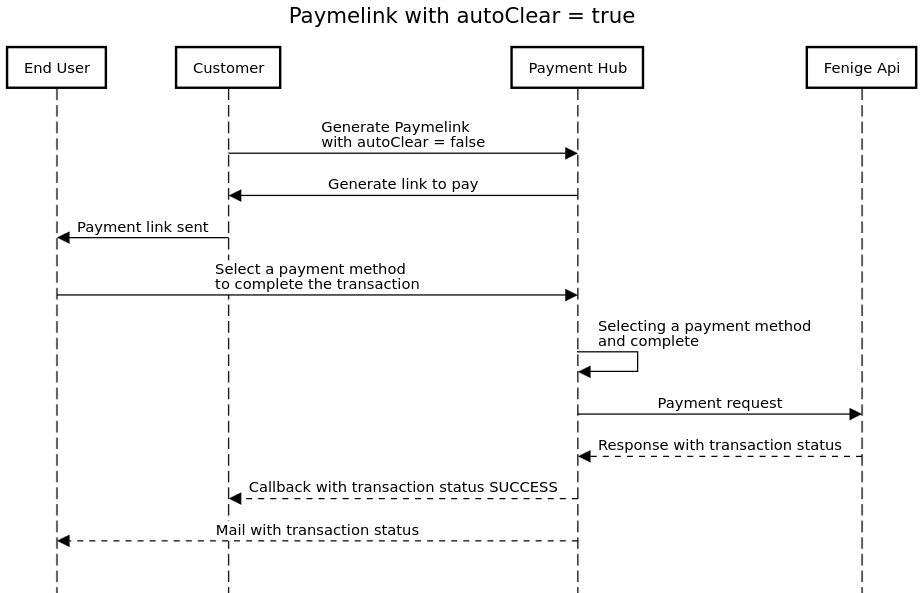
Paymelink allows you to generate a payment link. In the request, there is a parameter called autoClear, which is set to true by default. This means that the transaction will be automatically cleared by Fenige within a few hours.
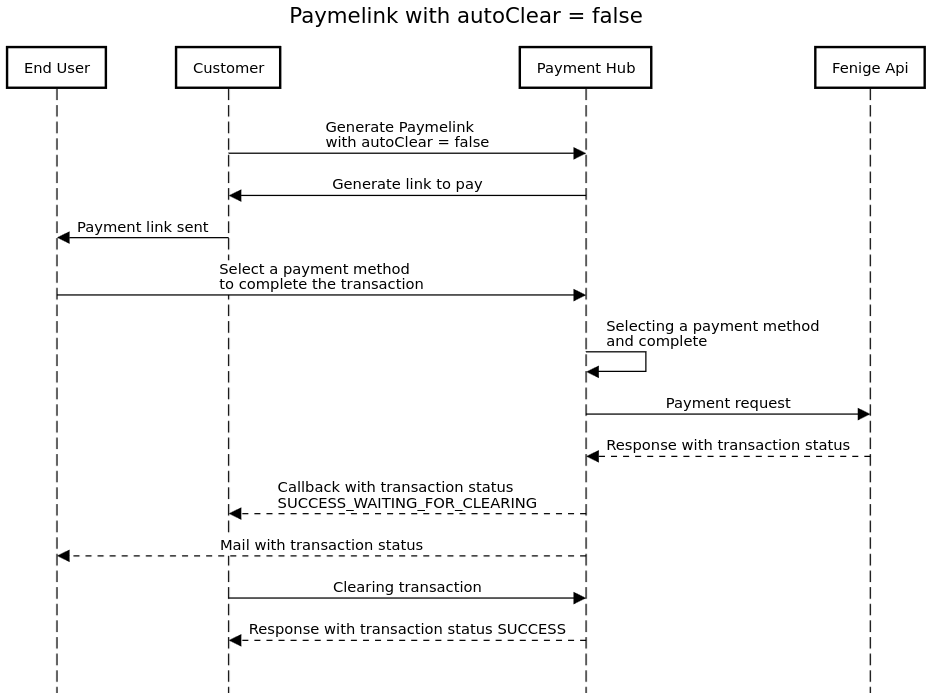
You can set this parameter to false, but you must remember to manually clear the transaction.
HTTP/1.1 200 OK
POST /external-api/paymelink HTTP/1.1
API-KEY: apiKey
Content-Type: application/json
Host: paytool-api-dev.fenige.pl
{
    "preInitData":{
        "transactionId":"fef48a14-f06a-44b7-b110-6ec468019375",
        "currencyCode":"PLN",
        "amount": 2599,
        "receiverAmount": 2599,
        "description":"test",
        "orderNumber":"a66026ab-e9f3-4aca-9fb1-25fa3c511a1b",
        "redirectUrl":{
            "successUrl":"https://default-success.url.com",
            "failureUrl":"https://default-failure.url.com",
            "cancelUrl":"https://default-cancel.url.com"
        },
        "formLanguage":"en",
        "sender":{
            "firstName":"test",
            "lastName":"test",
            "email" : "test@fenige.pl",
            "address":{
                "countryCode":"PL",
                "city":"Lublin",
                "postalCode":"20-149",
                "street":"test",
                "houseNumber":"1234"
            }
        },
        "autoClear":false,
        "merchantUuid" : "f762a329-c138-4475-b4fa-3a397a37e448",
        "countryOfResidence" : "PL",
        "allowedPaymentMethods" : ["CARD"]
    }
}|
Request fields |
|||
|
Name |
Type |
Validation |
Description |
|
|
|
@Must not be null |
This is the id of the entire transaction process |
|
|
|
@Must not be null |
Transaction currency |
|
|
|
@Must not be null |
Transaction amount in pennies |
|
|
|
@Optional field, @Must be greater or equals 0 if exists |
Declared amount. Fenige Information field (in pennies) |
|
|
|
@Must not be null |
Transaction description |
|
|
|
Optional. Length(max=255) |
Order number |
|
|
|
@Must not be null |
Url to redirect user after success transaction |
|
|
|
@Must not be null |
Url to redirect user after failure transaction |
|
|
|
@Must not be null |
Url to redirect user after cancel transaction |
|
|
|
@Must not be null |
Language in PaymentHub website |
|
|
|
Optional. @Length(min = 2, max = 35), @Pattern(regexp = ^(?!\s)[^0-9!#|$^`\\~_%&\"'(){}*+,./:;<=>?@\t\n\]\[]*(?< !\s)$) Cannot contains tabulations and line breaks. |
First name of payer. First name sent in preInitialization will not be required in the payment form by the end user. |
|
|
|
Optional. @Length(min = 2, max = 35), @Pattern(regexp = ^(?!\s)[^0-9!#|$^`\\~_%&\"'(){}*+,./:;<=>?@\t\n\]\[]*(?< !\s)$) Cannot contains tabulations and line breaks. |
Last name of payer. Last name sent in preInitialization will not be required in the payment form by the end user. |
|
|
|
Must be a well-formed email address. @Length(min = 1, max = 128) @Pattern(regexp = ^(?:[A-Za-z0-9]{1,}[\.!#$%&'*+/=?`{|}~^\-_]?){1,}[A-Za-z0-9_-]*@((?:[a-zA-Z0-9]+(?:-[a-zA-Z0-9]+)*\.){1,}[a-zA-Z]{2,})$) |
Email of payer. Email sent in preInitialization will not be required in the payment form by the end user. |
|
|
|
Optional |
Country code |
|
|
|
Optional |
Name of city |
|
|
|
Optional |
Postal code |
|
|
|
Optional |
Name of street |
|
|
|
Optional |
House number |
|
|
|
Optional |
Apartment number |
|
|
|
Optional |
Country code |
|
|
|
Optional |
Name of city |
|
|
|
Optional |
Postal code |
|
|
|
Optional |
Name of street |
|
|
|
Optional |
House number |
|
|
|
Optional |
Apartment number |
|
|
|
Optional |
Province code |
|
|
|
@Must not be null |
Is auto clear enabled. Enabled if true, is not enabled if false. There is
7
days for execute clearing process if autoClear = false |
|
|
|
Optional |
Is necceseary when you have more than one merchant in payhub service |
|
|
|
Length(min = 2, max = 2) |
Country code in accordance with ISO 3166-1 Alpha-2. Is required for terminal crypto. Country of residence sent in preInitialization will not be required in the payment form by the end user. |
|
|
|
Optional |
Passing CARD here will directly display only the card form. If null is sent, the default payment configuration will be retrieved. |
Response body:
|
|
Response fields |
||
|
Name |
Type |
Description |
|
|
|
Link to payment |
|
|
|
This is the id of the entire transaction process |
|
|
|
Expiration time of link to payment (in seconds of unix timestamp) |
Get transaction details
GEThttps://paytool-api-dev.fenige.pl/transactions/details/43ed2b94-792c-4e10-aca9-8cb7d69b1b85
|
|
Request details |
||
Name |
Type |
Description |
|
|
https://paytool-api-dev.fenige.pl/transactions/details/{transactionId} |
|
|
Transaction unique Id in system |
This method is optional and does not affect the process of the transaction itself. Nevertheless, Fenige recommends using this method. In case of any problem with the connection, it allows the Customer to know the current status of a given transaction. This method is secured by Customer's account credentials (basic authorization). Customer's account is created by Fenige during the onboarding process.
|
Request headers: |
|||
|
Type |
Value |
Constraints |
Description |
|
Authorization: |
Basic bG9naW46cGFzc3dvcmQ= |
Required |
Customer's account credentials |
|
Content-Type |
application/json |
Required |
Content type of the request |
Response body (possible variants):
Transaction status:
|
|
Response fields |
||
|
Name |
Type |
Description |
|
|
|
Request’s unique uuid in system |
|
|
|
Request’s unique uuid in PaymentHub |
|
|
|
Transaction creation date |
|
|
|
CoF Initial Uuid |
|
|
|
Transaction creation date |
|
|
|
Transaction Status |
|
|
|
Response code |
|
|
|
Transaction Retrieval Reference Number |
|
|
|
Transaction System Trace Audit Number (STAN) |
|
|
|
Clearing status |
|
|
|
Clearing creation date |
|
|
|
Acquirer Reference Number |
|
|
|
Is auto clear enabled. Enabled if true, is not enabled if false. There is 7 days for execute clearing process if autoClear = false |
|
|
|
Hidden card number |
|
|
|
Card provider |
|
|
|
Bank name - the value available when the name for a given bank is present on the list of BINs |
|
|
|
The total transfer amount |
|
|
|
Currency for transaction. Example: USD |
|
|
|
Type of transaction scope (DOMESTIC, CROSSBORDER, DOMESTIC_PL, INTRA_EU, INTER) |
|
|
|
First name of cardholder |
|
|
|
Last name of cardholder |
|
|
|
Cardholder’s email |
|
|
|
Cardholder Authentication Verification Value |
|
|
|
MPI status |
|
|
|
The clearing amount. This field is returned if this transaction has been cleared |
|
|
|
Refund date |
|
|
|
Refund amount |
|
|
|
Refund acquirer reference number |
|
|
|
Refund retrieval reference number |
|
|
|
Refund iso response code |
|
|
|
Refund status |
method cURL example:
|
Clearing
POST
https://paytool-api-dev.fenige.pl/external/clear
|
Clearing is the process where e-commerce and issuers exchange information about transaction data. It includes sending information about transactions from the e-commerce to the issuer for posting to the cardholder’s account. Using this method, we can just process transaction clearing. It is possible to execute clearing with full payment amount and partial payment amount. Notice that there is 28 days to execute clearing process if field 'autoClear' in payment request is set as 'false'. In the case of Mastercard, false flag means that the transaction is treated as a pre-authorization and, according to the organization's requirements, the clearing time is 30 days from the time of authorization.
HTTP/1.1 200 OK
POST /external/clear HTTP/1.1
Authorization: Basic dXNlcjpwYXNzd29yZA==
Content-Type: application/json
Content-Length: 145
Host: paytool-api-dev.fenige.pl
{
    "transactionId" : "e732767c-402d-42af-8a11-63fe7f8bff91",
    "merchantUuid" : "e59b470b-bdb1-4043-a856-86b624c2a607",
    "clearingAmount" : 700
}|
Request fields |
|||
|
Name |
Type |
Validation |
Description |
|
|
|
Must not be null |
This is the id of the entire transaction process |
|
|
|
Must not be null |
Merchant’s unique uuid in system |
|
|
|
@Must be at least 1 |
Amount of payment (in pennies) to partial clearing |
Response body:
|
|
Response fields |
||
|
Name |
Type |
Description |
|
|
|
Clearing status |
|
|
|
Completion estimate for clearing |
Refund
POST
https://paytool-api-dev.fenige.pl/external/transaction/refund
|
This method can be used for refund amount of a previously performed transaction. Each transaction can be refunded at least once. Total amount of refund cannot exceed the payment amount. It is important to know, that you can make a refund of transaction that is cleared for now.
HTTP/1.1 200 OK
POST /external/transaction/refund HTTP/1.1
Authorization: Basic dXNlcjpwYXNzd29yZA==
Content-Type: application/json
Content-Length: 145
Host: paytool-api-dev.fenige.pl
{
    "transactionId" : "d77b4fd4-5a90-4e36-84b7-a75346d04ca0",
    "amountToRefund" : 100
}|
Request fields |
||
|
Name |
Type |
Description |
|
|
|
This is the id of the entire transaction process |
|
|
|
Amount to refund (in pennies) |
Response body: |
|
Response fields |
||
|
Name |
Type |
Description |
|
|
|
Refund status |
Reverse
POST
https://paytool-api-dev.fenige.pl/external/reverse
|
This method could be used in order to cancel payment of correctly registered transaction in system before. To process reversal method, the transaction must not be cleared. In response, we receive detailed information about the reversal.
HTTP/1.1 200 OK
POST /external/reverse HTTP/1.1
Authorization: Basic dXNlcjpwYXNzd29yZA==
Content-Type: application/json
Content-Length: 145
Host: paytool-api-dev.fenige.pl
{
    "transactionId" : "e732767c-402d-42af-8a11-63fe7f8bff91",
    "merchantUuid" : "e59b470b-bdb1-4043-a856-86b624c2a607"
}|
Request fields |
|||
|
Name |
Type |
Validation |
Description |
|
|
|
@Must not be null |
This is the id of the entire transaction process |
|
|
|
@Must not be null |
Merchant’s unique uuid in system |
Response body: |
|
Response fields |
||
|
Name |
Type |
Description |
|
|
|
Reversal status |
PaymentHub Backend to Backend integration
In this section, you will find a description of the methods related to the technical integration of server-to-server communication between PaymentHub and your infrastructure.
Cryptography
Public Key
GEThttps://paytool-api-dev.fenige.pl/external-api/public-key
|
Public key is necessary for encrypt payload for 3DS. Below there are two payloads to encrypt for 3DS. Important is remembered about structure.
curl --location --request GET 'https://paytool-api-dev.fenige.pl/external-api/public-key' \
--header 'Content-Type: application/json' \
--header 'API-KEY: *******' \
Jwe Encryption
Use example code to encrypt payload token or card by public key.
import java.security.KeyFactory;
import java.security.interfaces.RSAPublicKey;
import java.security.spec.X509EncodedKeySpec;
import java.util.Base64;

public class JweEncrypt {

    private static final String ALGORITHM = "RSA";
    private final KeyFactory keyFactory;

    public JweEncrypt() throws NoSuchAlgorithmException {
        keyFactory = KeyFactory.getInstance(ALGORITHM);
    }

    public String encryptPayload(String value) throws Exception {

        X509EncodedKeySpec encodedKeySpec = new X509EncodedKeySpec(Base64.getDecoder()
                                                                         .decode(getPublicKey()));

        RSAPublicKey rsaPublicKey = (RSAPublicKey) keyFactory.generatePublic(encodedKeySpec);
        RSAEncrypter rsaEncrypter = new RSAEncrypter(rsaPublicKey);
        JWEHeader jweHeader = new JWEHeader(JWEAlgorithm.RSA_OAEP_256, EncryptionMethod.A256GCM);
        Payload payload = new Payload(value);
        JWEObject jweObject = new JWEObject(jweHeader, value);
        jweObject.encrypt(rsaEncrypter);
        return jweObject.serialize();
    }

    /* Public key received from PayHub */
    public String getPublicKey() {
        return "MIIBIjANBgkqhkiG9w0BAQEFAAOCAQ8AMIIBCgKCAQEAo7vHPuwRxESCI7mVlj/Q";
    }
}
Payload to encrypt
Implement logic from Jwe Encryption and use it to encrypt payload
Request body for card:
|
|
Request fields |
|||
|
Name |
Type |
Validation |
Description |
|
|
|
Not empty |
Sender email |
|
|
|
Optional |
Sender phone |
|
|
|
Not empty. @Length(min = 2, max = 35), @Pattern(regexp = ^(?!\s)[^0-9!#|$^`\\~_%&\"'(){}*+,./:;<=>?@\t\n\]\[]*(?< !\s)$) Cannot contains tabulations and line breaks. |
Sender first name |
|
|
|
Not empty. @Length(min = 2, max = 35), @Pattern(regexp = ^(?!\s)[^0-9!#|$^`\\~_%&\"'(){}*+,./:;<=>?@\t\n\]\[]*(?< !\s)$) Cannot contains tabulations and line breaks. |
Sender last name |
|
|
|
Length must be 3 characters, Not null |
Cardholder’s card cvc2 |
|
|
|
Card number length must be between 12 and 19, Must not be blank, Must not be null |
Full cardholder’s card number must be between 12-digits and 19-digits |
|
|
|
Must match the regular expression ^(0[1-9]|1[0-2])\/?([0-9]{2})$, Must not be empty, Must not be null |
Expiration date of card mm/yy |
|
|
|
Optional |
Two character ISO 3166-1 alpha-2 code of country |
|
|
|
Optional |
Name of the city where cardholder lives |
|
|
|
Optional |
Postal code of this address |
|
|
|
Conditional |
Street name in the city. Required for Mastercard 3DS if shipAddress.street is empty |
|
|
|
Conditional |
House number with optional flat number. Required for Mastercard 3DS if shipAddress.houseNumber is empty |
|
|
|
Optional |
Apartment number |
|
|
|
Optional |
Province code |
|
|
|
Optional |
Two character ISO 3166-1 alpha-2 code of country |
|
|
|
Optional |
Name of the city where cardholder lives |
|
|
|
Optional |
Postal code of this address |
|
|
|
Conditional |
Street name in the city. Required for Mastercard 3DS if address.street is empty |
|
|
|
Conditional |
House number with optional flat number. Required for Mastercard 3DS if address.houseNumber is empty |
|
|
|
Optional |
Apartment number |
|
|
|
Optional |
Province code |
Request body for token:
|
|
Request fields |
|||
|
Name |
Type |
Validation |
Description |
|
|
|
Not empty. @Length(min = 1, max = 128) @Pattern(regexp = ^(?:[A-Za-z0-9]{1,}[\.!#$%&'*+/=?`{|}~^\-_]?){1,}[A-Za-z0-9_-]*@((?:[a-zA-Z0-9]+(?:-[a-zA-Z0-9]+)*\.){1,}[a-zA-Z]{2,})$) |
Sender email |
|
|
|
Optional |
Sender phone |
|
|
|
Not empty |
Sender first name |
|
|
|
Not empty |
Sender last name |
|
|
|
Not null |
Token obtained from Google or Apple |
|
|
|
Not null |
Token signature |
|
|
|
Not null |
Token intermediate signing key |
|
|
|
Not null |
Signed key |
|
|
|
Not null |
Token signatures |
|
|
|
Not null |
Protocol version |
|
|
|
Not null |
Signed message |
Response body: |
|
Response fields |
||
|
Name |
Type |
Description |
|
|
|
Encrypted sender data |
method cURL example:
|
Pre Initialization
POSThttps://paytool-api-dev.fenige.pl/transactions/pre-initialization
|
Before executing each transaction, you must initiate transactions in payhub. In response, you obtain transactionId which should be used when requesting a payment.
Request body:
|
|
Request fields |
|||
|
Name |
Type |
Validation |
Description |
|
|
|
Not empty |
Transaction currency |
|
|
|
@Must not be null, @Must be at least 100 |
Transaction amount (in pennies). [1PLN = 100] |
|
|
|
Optional |
Information field only. Field determine receiving amount of cash transferred in one hundredth of the currency. [1PLN = 100] |
|
|
|
Optional, @Length(min = 0, max = 20) |
Merchant defined transaction reference identifier |
|
|
|
Optional |
Simple description of transaction |
|
|
|
Optional |
URL address of merchant web system |
|
|
|
@Length(min = 0, max = 255) |
Declarative number of order that is just purchased by cardholder, set by merchant, should be unique |
|
|
|
Optional |
Language of transaction process in web browser, use only lowercase |
|
|
|
Optional |
URL of merchant web service to forward after successful payment flow |
|
|
|
Optional |
URL of merchant web service to forward after failure payment flow |
|
|
|
Optional |
URL of merchant web service to forward after cancel payment flow |
|
|
|
Optional. @Length(min = 2, max = 35), @Pattern(regexp = ^(?!\s)[^0-9!#|$^`\\~_%&\"'(){}*+,./:;<=>?@\t\n\]\[]*(?< !\s)$) Cannot contains tabulations and line breaks. |
Sender first name. Required for Funding from Card. First name sent in preInitialization will not be required in the payment form by the end user. |
|
|
|
Optional. @Length(min = 2, max = 35), @Pattern(regexp = ^(?!\s)[^0-9!#|$^`\\~_%&\"'(){}*+,./:;<=>?@\t\n\]\[]*(?< !\s)$) Cannot contains tabulations and line breaks. |
Sender last name. Required for Funding from Card. Last name sent in preInitialization will not be required in the payment form by the end user. |
|
|
|
Must be a well-formed email address. @Length(min = 1, max = 128) @Pattern(regexp = ^(?:[A-Za-z0-9]{1,}[\.!#$%&'*+/=?`{|}~^\-_]?){1,}[A-Za-z0-9_-]*@((?:[a-zA-Z0-9]+(?:-[a-zA-Z0-9]+)*\.){1,}[a-zA-Z]{2,})$) |
Sender email. Email sent in preInitialization will not be required in the payment form by the end user. |
|
|
|
Optional |
Two character ISO 3166-1 alpha-2 code of country. Required for crypto merchants, for transactions above 15,000 EUR and for Funding from Card. |
|
|
|
@Conditional - based on terminal configuration @Length(min = 2, max = 2) |
Province code of the sender. Required for Funding from Card, when receiverCountry is USA or CAN. |
|
|
|
Optional. @Length(min = 1, max = 55), @Pattern(regexp = ^(?!.*[\n\r\t])\S+( \S+)*$) |
Name of the city where cardholder lives. Required for transactions above 15,000 EUR and for Funding from Card. |
|
|
|
Optional. @Length(min = 1, max = 10), @Pattern(regexp = (^[a-zA-Z\d][a-zA-Z\d\- ]{0,9}[a-zA-Z\d]$)|^[a-zA-Z1-9]$) |
Postal code of this address. Required for transactions above 15,000 EUR and for Funding from Card. |
|
|
|
Optional. @Length(min = 1, max = 55), @Pattern(regexp = [\\s\](\\s[^\\s]+)*$) |
Street name in the city. Required for transactions above 15,000 EUR and for Funding from Card. |
|
|
|
Optional |
House number with optional flat number |
|
|
|
Optional @Length(min = 1, max = 5), @Pattern(regexp = ^[a-zA-Z0-9]*$) |
Optional sender apartment number for Funding from Card. |
|
|
|
Optional |
Two character ISO 3166-1 alpha-2 code of country. Required for crypto merchants, for transactions above 15,000 EUR and for Funding from Card. |
|
|
|
@Conditional - based on terminal configuration @Length(min = 2, max = 2) |
Province code of the sender. Required for Funding from Card, when receiverCountry is USA or CAN. |
|
|
|
Optional. @Length(min = 1, max = 55), @Pattern(regexp = ^(?!.*[\n\r\t])\S+( \S+)*$) |
Name of the city where cardholder lives. Required for transactions above 15,000 EUR and for Funding from Card. |
|
|
|
Optional. @Length(min = 1, max = 10), @Pattern(regexp = (^[a-zA-Z\d][a-zA-Z\d\- ]{0,9}[a-zA-Z\d]$)|^[a-zA-Z1-9]$) |
Postal code of this address. Required for transactions above 15,000 EUR and for Funding from Card. |
|
|
|
Optional. @Length(min = 1, max = 55), @Pattern(regexp = [\\s\](\\s[^\\s]+)*$) |
Street name in the city. Required for transactions above 15,000 EUR and for Funding from Card. |
|
|
|
Optional |
House number with optional flat number |
|
|
|
Optional @Length(min = 1, max = 5), @Pattern(regexp = ^[a-zA-Z0-9]*$) |
Optional sender apartment number for Funding from Card. |
|
|
|
Optional - based on terminal configuration @Pattern(“yyyy-MM-dd”) |
Date of birth of the sender. Required for Funding from Card. |
|
|
|
@Conditional - based on terminal configuration @Length(min = 2, max = 35), @Pattern(regexp = ^(?!\s)(?!.*\x20{2})(?!.*\p{C})(?!.*[\p{Z}&&[^\x20]])(?!.*\p{S})[^0-9!#|$^`\~_%&"'(){}*+,./:;<=>?@\t\n\]\[]*(?<!\s)$) |
Required for Funding from Card. In case of a top-up to an electronic wallet, provide the first name of the individual who owns the wallet. If receiver is a company, please provide the name of the entity that is the intended recipient of the funds. |
|
|
|
@Conditional - based on terminal configuration @Length(min = 2, max = 35), @Pattern(regexp = ^(?!\s)(?!.*\x20{2})(?!.*\p{C})(?!.*[\p{Z}&&[^\x20]])(?!.*\p{S})[^0-9!#|$^`\~_%&"'(){}*+,./:;<=>?@\t\n\]\[]*(?<!\s)$) |
Required for Funding from Card. In case of a top-up to an electronic wallet, provide the last name of the individual who owns the wallet. If receiver is a company, please provide the name of the entity that is the intended recipient of the funds. |
|
|
|
@Conditional - based on terminal configuration @NotNull @NotBlank |
Required for Funding from Card. Indicates the type of account specified in the receiverAccountNumber field. Possible values: RTN_BANK_ACCOUNT, IBAN, CARD_ACCOUNT, EMAIL, PHONE_NUMBER, BANK_BIC, WALLET_ID, SOCIAL_NETWORK_ID. |
|
|
|
@Conditional - based on terminal configuration @NotNull @NotBlank |
Required for Funding from Card. Account to which the funds are transferred. For wallet top-ups, provide the wallet ID, email address, or phone number of the wallet owner. Maximum @Length according to payment organization requirements set to 34 characters for Visa and 50 characters for Mastercard. |
|
|
|
@Conditional - based on terminal configuration @NotNull |
Required for Funding from Card. In case of a top-up to an electronic wallet, provide the country of the individual who owns the wallet. If receiver is a company, provide here the country of the institution. |
|
|
|
@Conditional - based on terminal configuration @Length(min = 2, max = 2) |
US state or Canadian province code of the receiver. Required for Funding from Card, when receiverCountry is USA or CAN. |
|
|
|
Optional. @Length(min = 1, max = 55), @Pattern(regexp = [\\s\](\\s[^\\s]+)*$) |
Street name in the city. Required for transactions above 15,000 EUR and for Funding from Card when the card is a Visa issued in Canada, Australia, New Zealand, or the South Pacific Countries. |
|
|
|
Optional. @Length(min = 1, max = 5), @Pattern(regexp = ^[a-zA-Z0-9]+$) |
House number with optional flat number. Required for transactions above 15,000 EUR and for Funding from Card when the card is a Visa issued in Canada, Australia, New Zealand, or the South Pacific Countries. |
|
|
|
Optional |
In configuration merchant is set true. When u set false in request u will have 7 days for execute clearing process. Can’t be disabled for Funding from Card initiated by Visa card. |
|
|
|
Optional |
Type of Authorization. Possible values: PURCHASE, COF, RECURRING. Available for card flow, default PURCHASE |
|
|
|
Length(min = 2, max = 2) |
Country code in accordance with ISO 3166-1 Alpha-2. Is required for terminal crypto and for Funding from Card. Country of residence sent in preInitialization will not be required in the payment form by the end user. |
|
|
|
Optional |
Passing CARD here will directly display only the card form. If null is sent, the default payment configuration will be retrieved. |
|
|
|
Optional, @Must not be null only for typeOfAuthorization = RECURRING) |
This field contains the date after which no further authorizations shall be performed. The format of this field must be: YYYYMMDD |
|
|
|
Optional, @Must not be null only for typeOfAuthorization = RECURRING) |
The number of days between recurring payments. This field indicates the minimum number of days between authorizations |
|
|
|
Optional, Length(min = 0, max = 150) |
Additional note to transaction |
Response body: |
|
Response fields |
||
|
Name |
Type |
Description |
|
|
|
This is the id of the entire transaction process |
curl 'https://paytool-api-dev.fenige.pl/transactions/pre-initialization' -i -X POST \
    -H 'API-KEY: 'apiKey' \
    -H 'Content-Type: application/json' \
    -d '{
  "currencyCode": "PLN",
  "amount": 1000,
  "receiverAmount": 1000,
  "description": "Test transaction",
  "merchantUrl": "https://www.fenige.com",
  "orderNumber": "#12773",
  "formLanguage": "pl",
  "redirectUrl": {
    "successUrl": "https://www.fenige.com",
    "failureUrl": "https://www.fenige.com",
    "cancelUrl": "https://www.fenige.com"
  },
  "sender": {
    "firstName": "firstName",
    "lastName": "lastName",
    "email": "test@fenige.pl",
    "address": {
        "countryCode": "PL",
        "city": "Lublin",
        "postalCode": "20-103",
        "street": "Rusałka",
        "houseNumber": "17a"
    },
    "shipAddress": {
        "countryCode": "PL",
        "city": "Lublin",
        "postalCode": "20-103",
        "street": "Rusałka",
        "houseNumber": "10"
    }
  },
  "autoClear": true,
  "countryOfResidence": "PL"
}'
3DS
Initialize
POSThttps://paytool-api-dev.fenige.pl/external-api/transactions/3ds
|
3DS process initialization
Request body:
|
|
Request fields |
|||
|
Name |
Type |
Validation |
Description |
|
|
|
Not null |
Uuid merchant in PaymentHub |
|
|
|
Not null |
This is the id of the entire transaction process |
|
|
|
Not null |
Unique correlation id |
|
|
|
Not null |
Encrypted sender data for payment(Card and Token) -> Cryptography |
|
|
|
Not null |
Data from user browser to show 3DS template |
|
|
|
Optional |
Client IP address. Example: "1.1.1.1". |
|
|
|
Optional |
Java support status in the browser. Example: "ENABLED". |
|
|
|
Optional |
Whether JavaScript is enabled |
|
|
|
Optional |
Browser window size. Example: "S_250X400". |
|
|
|
Optional |
HTTP |
|
|
|
Optional |
Preferred browser language. Example: "PL". |
|
|
|
Optional |
Screen height in pixels. Integer (px). Example: 200. |
|
|
|
Optional |
Screen width in pixels. Integer (px). Example: 200. |
|
|
|
Optional |
User time zone. Offset from UTC in minutes. Example: 60. |
|
|
|
Optional |
User-Agent header. Example: "Mozilla/5.0". |
|
|
|
Optional |
Screen color depth. Bits per pixel. Example: 24. |
|
|
|
Not null |
Type of transaction. Possible values: ONE_TIME_PAYMENT, GOOGLE_PAY, APPLE_PAY, BLIK |
|
|
|
Must not be empty |
This field specifies the URL to which the ACS will post threeDSMethodData when the hidden iframe post form from browse |
|
|
|
Not null |
This property specifies the URL to which the final challenge response is POSTed |
Response body OK:
|
|
Response fields |
||
|
Name |
Type |
Description |
|
|
|
The timestamp (in milliseconds since the epoch) when the session was created. |
|
|
|
The timestamp (in milliseconds since the epoch) when the session expires. |
|
|
|
A unique identifier for the merchant session. |
|
|
|
A unique, random string generated for this session. |
|
|
|
The identifier for the merchant. |
|
|
|
The domain name of the website where Apple Pay is being used. |
|
|
|
The display name of the merchant. |
|
|
|
A cryptographic signature of the session data. |
|
|
|
An identifier used for operational analytics. |
|
|
|
The number of retries that have been attempted for this session. |
|
|
|
The Payment Service Provider Identifier. |
method cURL example:
|
Continue
POSThttps://paytool-api-dev.fenige.pl/external-api/transactions/3ds/continue
|
3DS process continue
Request body:
|
|
Request fields |
|||
|
Name |
Type |
Type |
Description |
|
|
|
Not null |
Uuid merchant in PaymentHub |
|
|
|
Not null |
This is the id of the entire transaction process |
|
|
|
Not null |
Unique correlation id |
|
|
|
Not null |
Encrypted sender data for payment(Card and Token) -> Cryptography |
|
|
|
Not null |
Type of transaction. Possible values: ONE_TIME_PAYMENT, GOOGLE_PAY, APPLE_PAY, BLIK |
|
|
|
Not null |
This property specifies the URL to which the final challenge response is POSTed |
Response body OK:
|
|
Response fields |
||
|
Name |
Type |
Description |
|
|
|
The timestamp (in milliseconds since the epoch) when the session was created. |
|
|
|
The timestamp (in milliseconds since the epoch) when the session expires. |
|
|
|
A unique identifier for the merchant session. |
|
|
|
A unique, random string generated for this session. |
|
|
|
The identifier for the merchant. |
|
|
|
The domain name of the website where Apple Pay is being used. |
|
|
|
The display name of the merchant. |
|
|
|
A cryptographic signature of the session data. |
|
|
|
An identifier used for operational analytics. |
|
|
|
The number of retries that have been attempted for this session. |
|
|
|
The Payment Service Provider Identifier. |
method cURL example:
|
Finalize
POSThttps://paytool-api-dev.fenige.pl/external-api/transactions/3ds/finalize
|
3DS process finalization
Request body:
|
|
Request fields |
|||
|
Name |
Type |
Type |
Description |
|
|
|
Not null |
Uuid merchant in PaymentHub |
|
|
|
Not null |
This is the id of the entire transaction process |
|
|
|
Not null |
Unique correlation id |
|
|
|
Not null |
Encrypted sender data for payment(Card and Token) -> Cryptography |
|
|
|
Not null |
Type of transaction. Possible values: ONE_TIME_PAYMENT, GOOGLE_PAY, APPLE_PAY, BLIK |
Response body OK:
|
|
Response fields |
||
|
Name |
Type |
Description |
|
|
|
Transaction identifier will be returned when transaction was successful |
method cURL example:
|
Transaction
Google Pay
POSThttps://paytool-api-dev.fenige.pl/external-api/transactions/google-pay
|
The method allows e-commerce payment using a token obtained from Google Pay™. The method also accepts additional parameters such as transaction item ID or payer details.
Request body:
|
|
Request fields |
|||
|
Name |
Type |
Type |
Description |
|
|
|
Not empty |
This is the id of the entire transaction process |
|
|
|
Not empty |
Unique correlation id |
|
|
|
Not null |
Sender details |
|
|
|
Optional. @Length(min = 2, max = 35), @Pattern(regexp = ^(?!\s)[^0-9!#|$^`\\~_%&\"'(){}*+,./:;<=>?@\t\n\]\[]*(?< !\s)$) Cannot contains tabulations and line breaks. |
Sender first name |
|
|
|
Optional. @Length(min = 2, max = 35), @Pattern(regexp = ^(?!\s)[^0-9!#|$^`\\~_%&\"'(){}*+,./:;<=>?@\t\n\]\[]*(?< !\s)$) Cannot contains tabulations and line breaks. |
Sender last name |
|
|
|
Optional. @Length(min = 1, max = 128) @Pattern(regexp = ^(?:[A-Za-z0-9]{1,}[\.!#$%&'*+/=?`{|}~^\-_]?){1,}[A-Za-z0-9_-]*@((?:[a-zA-Z0-9]+(?:-[a-zA-Z0-9]+)*\.){1,}[a-zA-Z]{2,})$) |
Sender email |
|
|
|
Not null |
Token signature |
|
|
|
Not null |
Token intermediate signing key |
|
|
|
Not null |
Signed key |
|
|
|
Not null |
Token signatures |
|
|
|
Not null |
Protocol version |
|
|
|
Not null |
Signed message |
|
|
|
Optional |
Cardholder Authentication Verification Value. |
|
|
|
Optional |
Electronic Commerce Indicator: 5 (Visa) or 2 (SecureCode) - The cardholder was successfully authenticated. 6 (Visa) or 1 (SecureCode) - Authentication was attempted, but the cardholder was not enrolled |
|
|
|
Optional |
Authentication status: Y - (Full Authentication) - The customer was successfully authenticated. A - (Successful Attempted Authentication) - Authentication was not available, but functionality was available to generate a proof of authentication attempt. U - (Technical or other problem) - No liability shift, consider whether to proceed with the transaction |
|
|
|
Optional |
Server transaction Id generated by DS. Required for 3DS 2.x version. The transactionXId is the field that defines the 3DS version. The presence of this field in the HTTP request specifies that the transaction will be processed with 3DS 2.x. TransactionXId can be obtained by executing the /authentication method |
|
|
|
Optional |
Unique identifier for 3ds verification |
|
|
|
Must not be null |
Preferred browser language. Example: "PL". |
Response body OK:
|
Response body 3DS REQUIRED:
|
|
Response fields |
||
|
Name |
Type |
Description |
|
|
|
This is the id of the entire transaction process |
|
|
|
Transaction status |
|
|
|
Additional information when transaction status is failure, possible field values: "Google Pay token payment with PAN_ONLY authMethod parameter - 3DS is required" or "Transaction with eci = 07. 3ds is required to finish transaction." |
method cURL example:
|
Apple Pay
Open Session
POSThttps://paytool-api-dev.fenige.pl/external-api/session/apple
|
Opening of the session in apple is necessary to complete get apple pay token.
Request body:
|
|
Request fields |
|||
|
Name |
Type |
Validation |
Description |
|
|
|
Not null |
Url to open session in apple. |
|
|
|
Not empty |
This is the id of the entire transaction process |
Response body OK:
|
|
Response fields |
||
|
Name |
Type |
Description |
|
|
|
The timestamp (in milliseconds since the epoch) when the session was created. |
|
|
|
The timestamp (in milliseconds since the epoch) when the session expires. |
|
|
|
A unique identifier for the merchant session. |
|
|
|
A unique, random string generated for this session. |
|
|
|
The identifier for the merchant. |
|
|
|
The domain name of the website where Apple Pay is being used. |
|
|
|
The display name of the merchant. |
|
|
|
A cryptographic signature of the session data. |
|
|
|
An identifier used for operational analytics. |
|
|
|
The number of retries that have been attempted for this session. |
|
|
|
The Payment Service Provider Identifier. |
method cURL example:
|
Apple Pay
POSThttps://paytool-api-dev.fenige.pl/external-api/transactions/apple-pay
|
The method allows e-commerce payment using a token obtained from Apple Pay™.
Request body:
|
|
Request fields |
|||
|
Name |
Type |
Type |
Description |
|
|
|
Not null |
This is the id of the entire transaction process |
|
|
|
Unique correlation id |
|
|
|
|
Not null |
The version of the Apple Pay data format being used. |
|
|
|
Not null |
The version of the Apple Pay data format being used. |
|
|
|
Not null |
An encrypted string containing the payment information. |
|
|
|
Not null |
A cryptographic signature used to verify the authenticity of the payment data. |
|
|
|
Not empty |
The public key used to encrypt the payment data. This key is specific to the current session and is ephemeral (temporary). |
|
|
|
Not empty |
A hash of the public key used for encryption. |
|
|
|
Not empty |
A unique identifier for the payment transaction. |
|
|
|
Not empty |
The name of the payment method as displayed to the user. |
|
|
|
Not empty |
The payment network associated with the card used (e.g., "visa"). |
|
|
|
Not empty |
The type of payment card (e.g., "credit"). |
|
|
|
Not empty |
A unique identifier for the payment transaction. |
|
|
|
Optional. @Length(min = 2, max = 35), @Pattern(regexp = ^(?!\s)[^0-9!#|$^`\\~_%&\"'(){}*+,./:;<=>?@\t\n\]\[]*(?< !\s)$) Cannot contains tabulations and line breaks. |
Sender first name |
|
|
|
Optional. @Length(min = 2, max = 35), @Pattern(regexp = ^(?!\s)[^0-9!#|$^`\\~_%&\"'(){}*+,./:;<=>?@\t\n\]\[]*(?< !\s)$) Cannot contains tabulations and line breaks. |
Sender last name |
|
|
|
Not empty. @Length(min = 1, max = 128) @Pattern(regexp = ^(?:[A-Za-z0-9]{1,}[\.!#$%&'*+/=?`{|}~^\-_]?){1,}[A-Za-z0-9_-]*@((?:[a-zA-Z0-9]+(?:-[a-zA-Z0-9]+)*\.){1,}[a-zA-Z]{2,})$) |
Sender email |
|
|
|
Not null |
Language of transaction process |
Response body OK:
|
|
Response fields |
||
|
Name |
Type |
Description |
|
|
|
This is the id of the entire transaction process |
|
|
|
Transaction status |
|
|
|
Additional information when transaction status is failure |
method cURL example:
|
CoF
CoF Initial
CoF Subsequent
POSThttps://paytool-api-dev.fenige.pl/external/transactions/cof/subsequent
|
The second phase is the subsequent transaction, which requires a successful initial transaction containing the consent to store card data. Merchant provides the cofInitialUuid parameter received in the initial transaction, which defines the customer's card data saved in the transaction. Subsequent transactions are intended for multiple execution.
Request body:
|
|
Request fields |
|||
|
Name |
Type |
Type |
Description |
|
|
|
Not empty |
This is the id of the entire transaction process, set random uuid value |
|
|
|
Not empty |
CoF initial transaction identifier uuid, available when the 'typeOfAuthorization' field is set to 'COF' in the 'Pre Initialization' method |
|
|
|
Not empty |
Transaction currency |
|
|
|
@Must not be null, @Must be at least 100 |
Transaction amount (in pennies). [1PLN = 100] |
|
|
|
Optional |
Information field only. Field determine receiving amount of cash transferred in one hundredth of the currency. [1PLN = 100] |
|
|
|
Not null |
Language of transaction process |
|
|
|
Optional |
In configuration merchant is set true. When u set false in request u will have 7 days for execute clearing process |
Response body OK:
|
|
Response fields |
||
|
Name |
Type |
Description |
|
|
|
This is the id of the entire transaction process |
|
|
|
Transaction status |
|
|
|
Additional information when transaction status is failure |
method cURL example:
|
Recurring
Recurring Initial
Recurring Subsequent
POSThttps://paytool-api-dev.fenige.pl/external/transactions/recurring/subsequent
|
The second phase is the subsequent transaction, which requires a successful initial transaction containing the consent to store card data. Merchant provides the recurringInitialUuid parameter received in the initial transaction, which defines the customer's card data saved in the transaction. Subsequent transactions are intended for multiple execution.
Request body:
|
|
Request fields |
|||
|
Name |
Type |
Type |
Description |
|
|
|
Not empty |
This is the id of the entire transaction process, set random uuid value |
|
|
|
Not empty |
Recurring initial transaction identifier uuid, available when the 'typeOfAuthorization' field is set to 'RECURRING' in the 'Pre Initialization' method |
|
|
|
Not empty |
Transaction currency |
|
|
|
@Must not be null, @Must be at least 100 |
Transaction amount (in pennies). [1PLN = 100] |
|
|
|
Optional |
Information field only. Field determine receiving amount of cash transferred in one hundredth of the currency. [1PLN = 100] |
|
|
|
Not null |
Language of transaction process |
|
|
|
Optional |
In configuration merchant is set true. When u set false in request u will have 7 days for execute clearing process |
Response body OK:
|
|
Response fields |
||
|
Name |
Type |
Description |
|
|
|
This is the id of the entire transaction process |
|
|
|
Transaction status |
|
|
|
Additional information when transaction status is failure |
method cURL example:
|
Webhooks
To use the webhooks functionality, you must notify Customer Engagement Department by email. Then an URL address and a secret token will be configured, thanks to which communication between the Fenige side and the client side will be more secure. After configuring the above-mentioned properties, you will receive Secret Token and then you can handle webhooks from the Fenige system. The URL must be specified by the client, requests from the Fenige system will be directed to this address. The Secret Token will be set by the Fenige employee and sent to the client.
import hashlib

            # secret token established by client with Fenige employee
            secret = 'mNaU9TaK4m9myYYFBJgKu8slNH2fCKutJyzXwI'
            # transactionId received from webhook's request
            transactionId = 'c168a885-acfa-4a91-a1ad-ed7a042b7238'

            # concatenate strings in correct order
            concatenated = secret + transactionId

            # use SHA256 hashing function
            hashed = hashlib.sha256(concatenated.encode('utf-8')).hexdigest()

            # then compare 'hashed' variable with content of 'X-MERCHANT-SECRET' header
Info: Your server after receiving Webhook Event must return HTTP status 200 OK. Otherwise, the Fenige server will retry the request. There is 3 attempts for requesting your API. Repeated requests will be executing in 5 seconds intervals excluding timeout from client server.
Info: In order to protect client API by polling or other undesirable actions, the Fenige system uses headers. If you want to use Webhook events, you need to do the header handling on your side.
Info: Thanks to the 'X-MERCHANT-SECRET' header you can compare the hash on your backend side to eliminate attempts of unwanted requests. To build 'X-MERCHANT-SECRET' header: 1. Concatenate secret token established by you and Fenige’s employee with transactionId from received request body of callback event 2. Hash with SHA256 function result of above operation
{
    "transactionId": "35451011-399a-45bc-8391-a09a01d2a17d",
    "cofInitialUuid": "79e47300-aee2-4182-bf42-d920c15320ec",
    "orderNumber": "1",
    "transactionStatus": "SUCCESS",
    "amount": 100,
    "message": "Transaction finish with success",
    "currency": {
      "currencyName": "PLN"
    },
    "externalTransactionId": "35451011-399a-45bc-8391-a09a01d2a17d"
}
Info: If you do not receive a webhook with transaction details within 2 minutes,
you should use the
Get transaction details
method to obtain the final status (SUCCESS, FAILURE, REFUNDED, SUCCESS_WAITING_FOR_CLEARING, REVERSED).
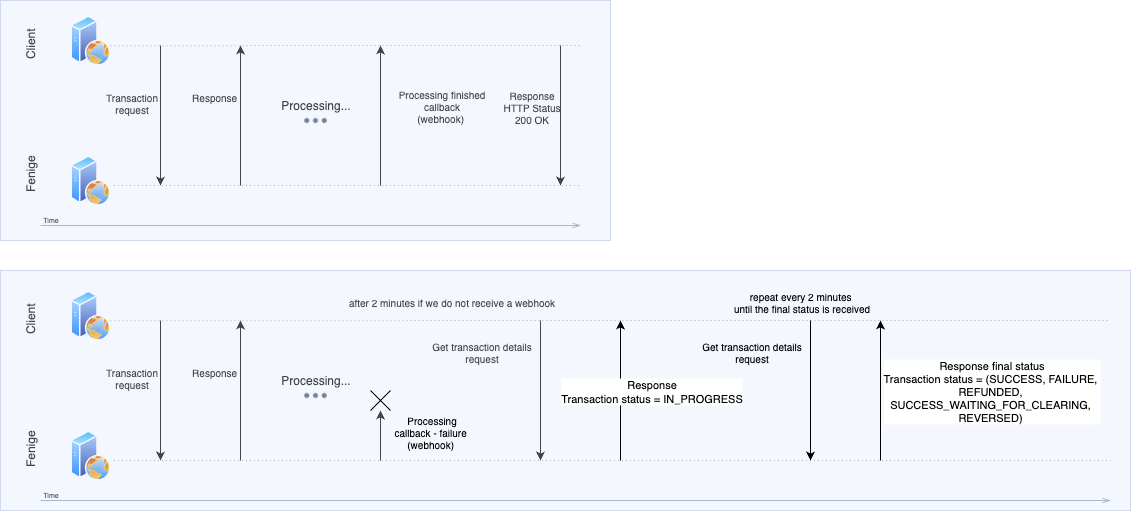
FAQ
Here you can find most frequency asked questions about Fenige API
Frequent asking questions.